In addition to the new Windows Stay At Home Servers Marketing, Microsoft Server 2008 is also launching it’s humorous marketing campaign. I like the part about drinking a “blue screen”!

Seems Microsoft is getting a little softer.
In addition to the new Windows Stay At Home Servers Marketing, Microsoft Server 2008 is also launching it’s humorous marketing campaign. I like the part about drinking a “blue screen”!
Seems Microsoft is getting a little softer.
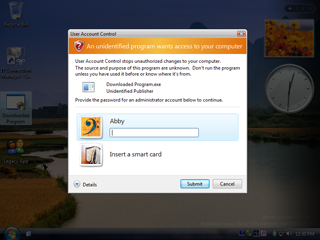 UAC, the impetus behind the famous Mac commercials, and the biggest frustration in Vista does have some reasoning behind it. One is that Microsoft wanted to allow non-techies to be able to use their computers without having admin rights. This is generally good. Techies that complain about UAC aren’t complaining just because of an extra step in getting a job done. They’re complaining because UAC is so annoyingly stupid:
– If you right-click on an item on the start menu and select “Run as Administrator”. It then prompts, “Cancel/Continue?”. It’s like when you asked your Mom for a glass of water and she replies, “I can’t hear you”, and you then had to reply, “May I have a glass of water, please?”
– Similarly, typing “regedit” at the command line forces the prompt. I specifically typed 7 characters and pressed return, does another mouse click really help?
Of course, the Microsoft engineers aren’t dumb, they did this on purpose; and the reason is usually misunderstood by those writing about UAC. Notice that when you are prompted for the privilege elevation, the entire screen dims, and the only window usable is the security prompt? Jesper, like many others, writes that UAC has nothing to do with malware. But this is not true! The elevation prompt screen is in a locked-down UI state; non-privileged programs are denied access to the UI at this time. This prevents a virus from moving your mouse to administrative programs or from typing “regedit” at your administrative prompts. It also prevents a trojan from displaying a dialog that *looks* like the UAC screen and getting you to type your password into it. This is why ItsVista noted that they couldn’t issue a print screen command on the elevation prompt. The malware countermeasures of UAC are much better described in this article from Microsoft.
Contributing to the confusion about UAC is that Microsoft employees have watered down the feature by implying that it’s not a security feature; Mark Russinovich writes,
“Because elevations and ILs don’t define a security boundary, potential avenues of attack , regardless of ease or scope, are not security bugs.”
I suspect this is lawyer talk; I don’t really understand it. To claim that all this good work isn’t security either means that you know there is a big hole in it (possible), or that a lawyer said not to describe it as a security feature so you don’t get sued. Jim Allchin likewise had some watered down comments about UAC here. Both claim that the only ‘secure’ way to prompt is to use Ctrl-Alt-Del. They are probably right. Windows has the fundamental security flaw that it allows one process to see the keystrokes and mouse events destined for another. This design flaw (also a flaw in many other windowing systems), is ultimately the reason we have UAC today.
Peer To Patent looks interesting (read the overview) – it facilitates getting public review of software patents.
Peer To Patent is a cool concept. Definitely positive. I wonder if there is enough incentive to reviewers to actually get substantial review? What if a few gracious companies offered cash to anyone that debunks a potential patent?
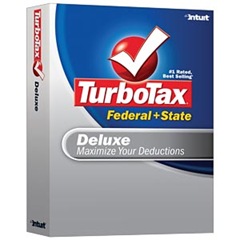 I’ve alternated between using each of these products over the last few years. Usually, it’s incredible how BOTH have the exact same offerings at the exact same price. This year, it’s a little harder to find their best price.
I’m not a big believer that either of these software packages can save you money. You still need to do your own research, understand your income, and experiment with filing methods to determine which path best optimizes your situation. But both do provide lots of tips for helping you discover the potential pitfalls and windfalls. Honestly, I see very little difference in functionality between these products.
The H&R Block web site offers the “Federal + State” package for $39.95. I haven’t seen a better price or any coupons.
The Intuit web site offers “Deluxe Federal + State” package for $44.95. However, you can buy this same software from Costco for $35.99. Further, this week Costco is offering a $15 coupon for it, so the price is effectively only $20.99.
Intuit is also promoting their online product; but it appears to be far more costly – $29.99 for federal and an additional $29.99 for state; e-filing is included for free. $60 and you get to put all your personal information on someone else’s web site! Hope they don’t get hacked! (If you were a hacker, it might be a gold-mine to try to hack, eh?)
Anyone find any better deals?
This year I’m using TurboTax; $20.99.
In stark contrast to yesterday’s photos of Hillary Clinton, here are the Barack Obama results. Again, these are only plucked from the first page of results. There were no pictures with popping-out eyeballs, rage, pointing fingers, grimaces, expressions of disdain, surprise, or disgust. Just an all-around, likeable guy.










Unfortunately, on average, people don’t read papers past the pictures. That’s why the USA Today is popular!
I’ve noted before that the press loves publishing horrible photos of Mrs. Clinton. They pick on her like no other. We’ve seen so many of these pictures, we’ve now begun to think she’s the dragon lady. Maybe she is. What do I know. I did a Google image search for Hillary Clinton, and here is what I saw. Every one of these is from the first page of results:










No wonder we find her unappealing. Tomorrow, I’ll post Barack Obama’s pictures. Who do you think the press wants for President? Who do you think really controls your vote?
 I tried out YSlow on some of my web sites recently. It’s pretty well done. Most of the tricks were known to me, but this one trick about ETags (Rule #13) was very interesting to read. Since ETags are indeed useless on my site, I’ve turned them off.
The basic problem is that many web servers (including Apache & IIS) use server-specific mechanisms to compute ETag values. This can break if the files are served from a server farm because each server in the farm can present a different ETag value.
Of course, synchronizing a value may seem easy; but in practice it is not. One suggestion might be to use a MD5 hash of the content. That can be made to work; but it isn’t trivial for a server; it either needs a cache of these, or it needs to re-compute. MD5 is relatively cheap to calculate, but certainly not free. If-Modified-Since solves the problem and requires no computation at all.