I got another request today from an old friend for how to make Lookout run inside Outlook 2007. I’ve probably received a thousand such requests over the last few years… Since I recently installed Outlook 2007, I finally was able to test it out.
This fix should make Lookout work. However, if you have other .NET addins running in Outlook, there is a chance they will no longer work. The fix is reversible though, so don’t be too scared. But this fix is definitely for the tech savvy. Gory details:
Installing Lookout on Outlook 2007
1) First, you’ll have to find a copy of Lookout. Microsoft doesn’t distribute it anymore, but issuing this search on Google seems to find it pretty handily.
2) Next, install Lookout. You’ll need admin privileges (no difference from XP), and the install will go without a hitch.
3) When you next restart Outlook, you’ll probably get this very apologetic-yet-unhelpful error dialog:
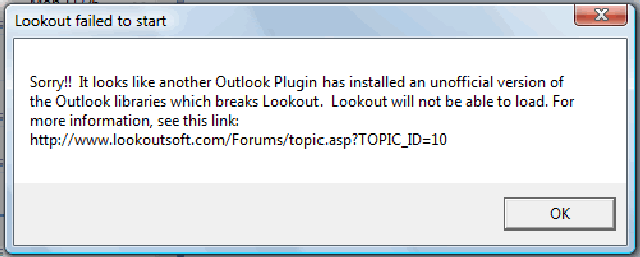
4) The problem is that Outlook 2007 ships the Outlook 2007 Office PIAs by default. Open a command shell (as administrator), and issue the following commands:
- cd %SYSTEMROOT%assemblyGAC
- rename Microsoft.Office.Interop.Outlook Microsoft.Office.Interop.Outlook.OLD
5) Restart Outlook and you are good to go.
Reversal
If this doesn’t work for you, or it breaks some other plugin, you’ll want to restore the interop library. Just undo the command above thusly:
- rename Microsoft.Office.Interop.Outlook.OLD Microsoft.Office.Interop.Outlook
Why does this dialog exist?
Only read this section if you are an Outlook plugin geek!
At the time Lookout was written, Microsoft’s strategy for shipping PIAs hadn’t fully been sorted out. Prior to Outlook 10, there were no official PIAs. Outlook 10 introduced official PIAs, which you could redistribute. Outlook 11 had official PIAs as well (different ones), but Microsoft didn’t permit redistribution of them, and they weren’t backward compatible. Further, with VS2003, it was pretty easy to create your own PIAs, which were almost identical to the official ones, but not signed. There were lots of plugins out there, and some of them handled PIAs badly.
At some point, Lookout ended up requiring that it be able to find the official Outlook 10 PIA installed, or it would assume it would fail. It wasn’t smart enough to recognize that new versions of the PIA might be legit, and probably should have handled it better. Who would have guessed that Outlook 12 would introduce yet a 3rd PIA distribution strategy? OL2007 elects to install the PIAs into the GAC by default; so plugins no longer needed to redistribute them at all. I do believe this is the best strategy.
What this simple fix does is temporarily uninstall the Office 12 version of the PIA. As long as no other .NET Outlook addins are running (C++ based addins don’t use PIAs), this has absolutely zero negative impact on your system. If other .NET addins exist on your system, and those addins are Outlook 11 or 12 specific (I don’t know of any OL12 specific plugins yet?), then you might have a problem with this fix. These conflicts should be rare, but not zero.
Anyway, search on!
BTW – This fix is thanks to the Wayback Machine! The original lookoutsoft support article (http://www.lookoutsoft.com/Forums/topic.asp?TOPIC_ID=10) is now long gone. But the Wayback Machine had it! Otherwise, there is no way I would have remembered what the heck this error was about.
Related Blog Posts:
http://pswamina.blogspot.com/2007/09/lookout-outlook-addin.html
http://odetocode.com/Blogs/scott/archive/2004/07/25/347.aspx
http://ewbi.blogs.com/develops/2006/04/outlook_lookout.html
http://www.joelonsoftware.com/items/2007/04/19.html
UPDATE
Thanks to Rohan Deshpande for consolidating updated instructions from the comments posted here. On some systems, the above instructions need to be augmented with two more steps:
* echo †> Microsoft.Office.Interop.Outlook * rename Policy.11.0.Microsoft.Office.Interop.Outlook Policy.11.0.Microsoft.Office.Interop.Outlook.OLD
Thanks so much. I would have downgraded my Outlook rather than lose ookout for Outlook. Windows Desktop search just annoy me.
Thanks a lot! For Outlook 2003, which is what we have installed at our company, this works right out of the box, with no tinkering required.
Thank you thank you thank you!
I fought, wrestled, kicked, screamed, and snarled rather than give up my lookout for outlook.
MS desktop search doesn’t work as well.
google search doesn’t work as well.
Outlook 2007 search…well, I reformatted my machine after installing that performance sucking vampiric monstrosity. So I can’t speak to it.
Lookout for Outlook just works. And works well. Thank you so much..!!!
Unfortunately it did not work for me. Apparently some other plugin (either Plaxo, IMS or NOD32) was interfering with the Lookout.
Oh, well. I still have to get along with Outlook search…:-(
I tried this and Outlook crashes each time I open it. I put the Interop rename back and Outlook opens. Anyone seen this?
Just FYI in case anyone else has problems, i got the same message after the fix, and Outlook was re-adding the file again.
I created an empty txt file called Microsoft.Office.Interop.Outlook
and then also renamed a policy file:
C:WINDOWSassemblyGAC>rename Policy.11.0.Microsoft.Office.Interop.Outlook Policy.11.0.Microsoft.Office.Interop.Outlook.OLD
Then Lookout worked for me
Thomas,
I had the same behavior. As soon as it started indexing, both Lookout and Outlook would crash (i.e. outlook.exe process would die).
I’m running Vista SP1 RC1 and Office 2007 SP1.
Oh well, I actually find the built-in Vista/Office search pretty servicable.
The fix may be “more dangerous” to your Outlook than the post warns. The warning stating this mildly should be perhaps more strongly worded.
For one, it will not allow Business Contact Manager for Outlook 2007 to work — or will cause the PIA to be reloaded into the GAC at Outlook Process start — or make Outlook puke all over itself, if BCM is installed (or Small Business Accounting for that matter).
The PIAs were placed there for a reason — and we may very well not know or understand the “why’s” surrounding the decision — but I am sure it was not just done on a whim.
Hey BD –
Sorry you had trouble. I don’t think there is any more danger than stated. This fix is just reconfiguring outlook to use a different PIA. The PIAs are not magical; they are pretty straightforward. That is why I previously cautioned that if you have apps which use them, they will not work with this configuration of Outlook.
You’ve identified one such plugin – BCM’07. You are right, the PIAs were not whimsically placed there; but if you want Outlook to work with Lookout, you’ll need to reconfigure it not to use the default PIA configuration.
As for “danger”; I haven’t heard of any real danger yet. And the steps are reversible, so risk is fairly contained. Also, as stated, this reconfiguration is for the techies out there, not for the novices.
Anyway, I suspect you are right about BCM’07. If you are using it, this change is not going to work by itself.
I did not have trouble — just was pointing out something. Outlook Search is not as bad as people say it is (in my opinion) unless they are doing things outside the normal (the stuff that only less than 5% of users are doing), or doing things like having 10 years of mails in the PST file.
There are patches released that speed up the app (plus fix stuff that did not get fixed in time for it’s release) that make it now a good upgrade choice.
As for BCM not going to like the lookout changes in this post — this one will be for sure. One of the two (lookout or BCM) will have to be removed. I know this because I used to work at MS on BCM — through the 07 release. More and more plugins will be written in C# (it is being encouraged nowadays), so the probability of something going bad will increase.
I am glad for resources like this that “help” users in that “less than 5% category” and are able to get themselves out of trouble if they got themselves into a mess. There will always be a need that will have to be filled for those wanting to push the envelope. It is the rest of the mere mortals (95% group) that should be sternly warned away from this type of stuff.
Cheers!!
I think outlook instant search is missing the best feature lookout had – sort by search ranking/match. How can you parse search results if you can’t sort by the most likely results? Am I missing something?
thanks so much for this, I can’t wait to start using lookout again!
Crashed at first, but then on next launch gave me the option of disabling the Symantec anti-virus plug-in.
When I try to rename the the interop file I get ‘access denied’ and i can’t seem to do anything about it. I’m logged in with admin rights…
Has anyone had any luck with this running on Vista? I’m having the same problem as Neal; I get an appcrash about a minute after the indexer starts running. I’m running Outlook 2007 on Vista (but not SP1 RC1).
Thanks!
For me too, it crashed after renaming the PIA assembly in GAC and starting outlook with lookout for the first time, but after that, it gave me wizard and started indexing..
Lets see.. how fast it is!! 🙂 (I have been using windows desktop search for emails.. and have found it significantly fast.. Is lookout more faster?? let me check!)
I don’t think i’m one of those users that want to “push the envelop” or am asking too much to expect a search tool to “search”.
I have mixed success with Outlooks 2007 search tool, and over all would give it a -100 as a score. It might work in one case but it doesn’t work at all in the other so that makes it completely unexceptable in my book.
I have my work laptop (XP sp2) running Outlook 2007 connected to an exchange email account and search works acceptably – at least it finds the things i’m looking for.
At home I am running Outlook 2007 connected to a POP3 account on my personal laptop (XP sp2) both machines are patched the same and everything else basically the same. At home, search doesn’t search. It acts like my daughter when she’s looking for something it could be right under its nose and it comes back empty handed. I have yet to get it to return even a single match for anything. I’ve rebuilt the search indexes repointed the data files, reinstalled this and that, and basically was to the point i wanted to roll back to Outlook 2003. Although i like the calendar features in 2007. And i like using the same version at home as at work for consistancy sake.
Luckily i ran across this site and was able to use Lookout. It actually returns matches when i look for things – that earns it an A+ in my book after the experience i had with the piss poor Outlook search version.
I don’t think I’ve asked for much.
After installing lookout, I get the message you stated. However I now have two versions of Microsoft.Interop.Office.Outlook so when I try to rename the file, it can’t do because there are duplicate names.
Pingback:Lookout search in Outlook 2007 at Rage on Omnipotent
Thanks so much for this fix, I was in the process of uninstalling Office2007 when I came across this posting on how to fix it.
Thanks again
Pingback:Standard Deviant » Lookout Update
I wish people would stop quoting that Microsoft killed Lookout; it’s just not true. If anyone killed Lookout, it’s the people that sold Lookout to Microsoft (oh yeah, that’s Eric & me).
I went to work on Desktop Search, rewrote parts of Lookout from C# to C++ so that it could work in a larger Microsoft product. That product was MSN Search, now Windows Desktop Search. So Lookout does live; it’s inside the product that so many here are complaining about.
Anyway, I don’t believe Microsoft killed lookout and I would hate for people to think that I did feel that way.
I am very flattered that people still find value from Lookout, which hasn’t been updated for 3.5 years now, while Google and Microsoft have been trying like mad to ‘own’ this product area. I guess the C# skeptics should think twice.
I am running Office Ultimate 2007 on XP SP2. I have the same duplicate file problem as Norbert… I would really like to use LookOut, but it seems like a pain to install.
Works very well, thanks for that tip!
Lookout is indexing my mail right now. 🙂
This workaround worked for me up until the point I had to relaunch Outlook. What appears to be happening is the Microsoft.Office.Interop.Outlook PIA is recreated after launching Outlook so that the next time, I launch Outlook I will get the same Lookout error. Therefore, I have to rename Microsoft.Office.Interop.Outlook PIA every time before I launch Outlook so that it doesn’t exist to have Lookout. Anyone know of a way to make it stay permanently? Maybe I am hitting the rare case Mike describes, but I am not aware of any special .Net plugins on my system.
Thanks,
Erica
I could not get it work;
As anybody a real work out,
in my situation the folder gets all the time reinstalled again
thx
ludi from vienna
Thanks for sharing. Lookout (i.e. Lucene.net) just rocks. I remember using the software way back in 2002/2003 and it just made life so efficient in Outlook.
Thanks for this advice. I tried it an the second time it worked (rename to Old, rename back, rename to Old).
I can imagine that you (Mike) wish that people would stop quoting that Microsoft killed Lookout. Maybe you are right. Maybe the people are right. The way I see it: Microsoft malformed the very good product Lookout in a worse and less functional slow running product.
Windows Desktop Search: 1 out of 5, Lookout: 5 out of 5.
Hi Floyd,
I had the same error message of “Access denied” of my first try. I then noticed that my Outlook 2007 was running. I closed it and tried again. Still got the same error. I worked on some other stuff for a while before coming back to do the renaming – it worked! Now my Lookout is working like charm…
Yiqi from Beijing, China
Thanks so much!
I have actually downgraded my Outlook 2007 to get back Lookout.
Now the only obstacle between Ol2007 and me is the ribbon. Once THAT is eliminated, I’ll sure go for Ol2007 🙂
Thanks again,
BigB
I understand Mike’s position, but for me the thing Lookout does that Desktop Search does not is search through ALL my *.pst files. I am just too lazy to save all my mail into a full on database so I can pull threads out to write customer support documents from.
J.
Got Lookout to work by
rename both file to .OLD
Microsoft.Office.Interop.Outlook
Policy.11.0.Microsoft.Office.Interop.Outlook
Create empty file
echo ” > Microsoft.Office.Interop.Outlook
reinstalled Lookout
Thanks to all for your help, as I can’t agree more about Microsoft seach
J
I have the same problem on Vista. Outlook crashes as soon as Lookout starts indexing.
Before I found this fix for Lookout on 2007 I installed Copernic Desktop Search which I find to be much better than Desktop Search and indexes archive PSTs. Very quick and unintrusive.
Gus
Unfortunately, it didn’t work for me. I tried the (updated) fix, but Outlook crashes on me on load, i.e. it doesn’t even finish loading 🙁
I can see that others in the comments have the same problem – no one with a fix? 🙂 I loved the old Lookout, hated WDS and can’t get Google to index my mails. I guess I will try to Copernic, like gus has. But I’d really prefer if I could get Lookout to work again!
– Henrik
Just for the record: There still is an “official” Microsoft Source in Austria (on a Microsoft Web site for small-and-medium enterprises), giving the opportunity to download LookOut 1.2: http://www.microsoft.com/austria/kmu/tipps-und-tricks/outlook-und-e-mail/lookout-die-schnelle-suchfunktion-fuer-outlook.mspx
[Rough Translation of the final part of the Link: lookout-the-fast-search-for-outlook.mspx]
I am running Vista Business with Outlook 2003 and Lookout 1.3 but unfortunately when I index Outlook crashes. Any solution?
Lookout is definitely dead. Sorry to say that, but the ‘sucessor’ products are non working bullshit. After using the Vista Desktop Search for a few months on large PST files (6 GB), the indexer stopped doing anything and no emails were found. You can imagine how frustrating it can be if you are in need to QUICKLY search a specific mail. No chance to get it without the indexer! And even if the WDS works, it works damn slow. I was a big fan of Lookout, but fact is: It’s gone. And there is no working successfor available at all.
Wow, thanks so much for this. I mourned the loss of lookout with O2007 and have spent a year trying to recreate it. I need “ACTIONABLE” searches. I was settled on Xobni and X1, both running simultaneously to get partual Lookout functionality with lots of overhead. Thanks to this article, I am now deinstalling both of these things. My computer is going to be much faster too, without all the parasitic draw of these two former applications.
Has anyone seen the issue where the Lookout toolbar loads blank without the search box and other buttons?
I’ve reinstalled and renamed the assembly several times with no luck. I’m running Outlook 2007 with SP1.
Any help would be much appreciated. Windows Desktop Search is not ideal.
I got 1.30 instead of 1.28 and now it works. Thanks!
Hey Mike,
I followed all the instructions but I am getting a crash in the following location when it starts indexing. Any ideas on how to fix this. This is on vista sp1 64 bit, running OLK 2007 with all the above + fixes to inventures_olk.dll and lookout.dll
0ffbf194 0cd265e5 msvcr71!free+0xc3 [f:vs70builds3052vccrtbldcrtsrcfree.c @ 103]
*** WARNING: Unable to verify checksum for MapiLib.dll
*** ERROR: Module load completed but symbols could not be loaded for MapiLib.dll
0ffbf1d8 0cd2aa49 MapiLib!.MapiLib.UMMapiEntryId.__ctor(MapiLib.UMMapiEntryId*, MapiLib.UMMapiEntryId*)+0x5d
0ffbf230 0cd2a953 MapiLib!.MapiLib.UMMapiItem.__ctor(MapiLib.UMMapiItem*, IMAPIProp*, MapiLib.UMMapiEntryId*)+0x89
0ffbf298 0cd2a7fc MapiLib!.MapiLib.UMMapiStore.GetItemFromId(MapiLib.UMMapiStore*, UInt32, ENTRYID*)+0xe3
I have to agree that the successor products lost a lot of what made LookOut special. I have OL2007 on both XP and Vista. The searching is “okay”on XP but does not work reliably on Vista at all. Basic searches will not find emails and they email in question is right in the INBOX!!!
The best for me about LookOut was that desktop search that was “hosted” within email. I am email-centric, but like being able to hit files systems too. I have not tried this installation yet, but i am sorely tempted.
YES!! It works. In haste, I tried it three times (unsuccessfully) before finally doing everything in the instructions exactly right and in the correct order. I have Outlook2007 on an XP machine. And LookOut is BAAAACK! Made my month. If yours doesn’t work, you might try working through the instructions again.
Excellent! It’s beautiful, working great!
Finally thanks for taking care of this, we been waiting long time!
Hi Mike,
Is there any way I can invoke the Lookout Search with a search string, from outside Outlook (commandline,wscript or even a wrapper dll…). I have Outlook running, and the result may also come in outlook, but I want the invocation to be done from outside. (The idea is I want to build an application like Google Searchbar that can get me to anywhere I want)
It’d be great if you can share any idea on how to do it. (I’m not aware of even simplest of .Net tricks, so anything would help).
Thanks,
Krishna
none of this worked for me. Going into ‘Tools” then “trust center” I noticed that the Add-ins listed Lookout as being ‘disabled’
I checked the box next to ‘Apply macros security settings to installed add-ins (with ‘Disabled items’ selected), then went to the macro security section of the trust center and changed it from ‘Warnings for signed macros; all unsigned macros are disabled’ to ‘warnings for all macros’.
Now I had to click OK on a bunch of warnings going into Outlook, but at least I had LookOut search tool again!!!
Now that it was working again, I returned to the trust center and under add-ins I removed the check box next to ‘ Apply macro security settings to installed add-ins.’ Now outlook starts without warnings and lookout is available after a few seconds.
lookout problem – every start is the 1st! can anyone help?
this is the 2nd time i’m experiencing this problem, and i can’t for the death of me remember how i sorted it out on the 1st round a few years back – namely – lookout keeps losing its custom location for index files, and ignores any user settings that i try to enter in the settings tabs.
i’ve found the
C:Documents and Settingsjohn doeLocal SettingsApplication DataLookout SoftwareLookoutOptions.Outlook.xml
file that contains what i need to manipulate, but even if i restore a backup of this file & make it read-only the program still uses default settings from somewhere else, just compaining about the read-only.
and as far as i can see, lookout doesn’t store anythinng of substance in the registry. but i am also wondering if this would have to do with an outlook user profile – it seems that something funky is going on with my custom forms as well.
(yes, i’ve already emailed this to mike but maybe someone else knows something, too…)
cheers.
I am under the impression that this week’s Office update disabled Lookout again 🙁 Any ideas what to do against it?
http://www.experts-exchange.com/Software/Office_Productivity/Groupware/Outlook/Q_23403732.html
see the link – sorted.
I installed Outlook 3.0 after working with it for 3 yrs in outlook 2003.
Its rock solid program
My env is Windows Vista SP1 – 64 bit
Outlook 2007
Then I saw Mike’s post about renaming
cd %SYSTEMROOT%assemblyGAC
rename Microsoft.Office.Interop.Outlook Microsoft.Office.Interop.Outlook.OLD
The above error did not come – but everytime I start outlook it crashed…..
Then I searched this same site and somebody posted to rename
Inventures_Olk.dll (84kb) – this file and replace with
Inventures_Olk.dll (80 ) .
This time, it did not crash, but indexing started but giving error
Finished Indexing but 1 error
!Failed : storeid and entryid cannot be null
If somebody interested to see bug coding and files, I can sent that as well…
Please help !!!!!!!!!!!!!!!!!!!
Regds
Uddhav
http://www.netfisco.com/myfiler/
Tried to make lookout 1.30 work on outlook 2007 and vista and failed: installation is fine and warning is gone, but indexer crashes every time it starts. Anyone sorted a similar setup out?
I loved Lookout, and Microsofts search is 3 times the work and often too slow. I can’t run multiple constraints on searchs.
The workaround mentioned appear to not be working for a number of people.
Please bring lookout back for Outlook 2007!
LookOut was wonderful – searching in Outlook 2007 is a nightmare – Totally agree “Please bring lookout back for Outlook 2007!”
I am sorry, but Microsoft killed Lookout. It worked in 2003, but it was prevented from working in 2007. Just the suggested fix implies that code, not vital to the operation of Outlook, was implanted to disable Lookout.
What we see here is how money trumps anti-competitiveness. Instead of doing this to a third-party product and risk the wrath of a Justice Department investigation into its anti-competitive practices, Microsoft threw money at the developers, bought the working product and buried it out back in Redmond – the home of buried innovation – in favor of an in-house solution that simply does not work.
That is classic Killing the Product, with a twist. (No, not a twist of the knife in my back – that’s yet another twist.)
A unhappy Office 2007 user.
Is the problem just the explicit check on the PIA version? i.e. If someone found a way to edit the binary to NOP the IF statement that checks the PIA version, do you think the rest of Lookout would work okay with the new PIA installed?
Pingback:crankygeek » Blog Archive » Windows Desktop Search 4.0 is the bomb
I love Outlook! Thank you so much for posting this page. It really made my day to be able to download it.
XP SP3
Outlook 2007
Lookout doesn’t show up after installation!! Help!!
I downloaded, installed, and overwritten with the “Inventures_Olk.dll” file. No error messages on start up of outlook, but it doesnt exist in the toolbar, view options, and no sign of it anywhere in outlook.
Anyone else having a quiet/hiding Lookout?
I will be your best friend if you help me get my lookout back.
Mikey
AWESOME… Thank you so much. I was going to downgrade back to 2003 until I found these instructions.
Thanks SO MUCH for posting this page!!!! I’ve been struggling with Outlook 2007 not indexing, install Error 1402’s, capicom.dll’s not registering, Windows Installer contstantly configuing at every open, – – and all manner of problems installing Office 2007 Enterprise on my new Vista 64bit. Pulling my hair out when Outlook REFUSED not to index using that Windows Search 4.0 thing. But this worked right out of the box with YOUR INSTRUCTIONS! Thanks again, I checked out a Google Ad on your site while I was here! 🙂
I have run into the same problem as justin. The lookout tool bar appears in the header of outlook but the bar is empty. If I select add/remove buttons drop down from that tool bar, Lookout is greyed out. Any thoughts on a work around.
PS I never saw the error message window first described above.
A big Thank You from Germany. Windows Desktopsearch made my PC sooo slow and Lookout gives much better results. I am very happy to have it run again.
YES – it works with Outlook 2007!! Thank you so very much!
Same problem here, lookout although installed at the trust center in no way shows in the toolbar anymore, really no clue how to solve this. If I can’t find a solution no other option than to downgrade to 2003 again
that’s perfect. I’m so happy to recover Lookout (which is the best) while using outlook 2007
many thanks for taking the time to share so valuable information
merci beaucoup 🙂
Laurent
Got it to work! I downloaded the two DLL files mentioned and placed them in the Lookout folder and it works … pretty well. The DLL’s were Lookout.dll and the Inventures_Olk.dll and it fired right up.
I have ONE PROBLEM. I can’t add any of my .pst files. I show them in the Options screen under the Index tab but when I check them and close out the screen they dissappear?
I recommend this resolution rather than renaming GAC Assembly.
http://www.wirwar.com/blog/2008/01/22/search-e-mail-at-lightspeed-using-
lookout-with-outlook-2007/
It works on my machine.
Cheers,
Pravin Patil
Thank you SO much for posting these instructions. I still have a copy of Lookout for Outlook but was crestfallen to discover it didn’t work right away after I upgraded to Office 2007. Your instructions have made everything right again.
I would also recommend the solution from Pravin Patil, renaming the Assembly is not a good idea if you are using AddOns or other Applications that use this Assembly.
Markus
Pingback:Diigo Diary 12/09/2008 « Benx Blog
It is awsome, I have been looking for some tool to search after lookout didnt work on 2007.
Windows search sucks. Reduces system performance.
thank you very much
With Outlook 2003 Professional Edition, the Lookout wizard runs EVERY time Outlook is launched. Sorry zdoe but there is nothing of substance in your expert-exchange.com link. Would appreciate some straight talking advice from anyone reading.
Thanks
I also get the Lookout Wizard EVERY time I start outlook 2007. Any ideas?
Mike, I don’t know if you can help with this one. Outlook 2007 Internals…:) Everytime I open Outlook I get:
“Either there is no default mail client or the current mail client cannot fulfill the request. Please run Microsoft Office Outlook and set it as the default mail client.” [OK].
I did some searches in Google and what i came up with is reinstall Outlook/Office. I didn’t want to go through that if there’s a fix.
Anyway, thanks for your input in advance.
ABSOLUTLY BRILLIANT! For a moment, I was the happiest man on the planet!
It works! It Works! It WORKS!
Thanks a lot Mike 🙂
I’m using Outlook 2007 with VISTA,
and after following instructions that Mike wrote
whenever I try to INDEX the emails.. Outlook crashes.
Anyone know how to make Lookout work with VISTA?
I miss lookout soooooo much T_T
This is GREAT, GREAT, GREAT, GREAT.
I could not hold back my tears when my IT organisation decided to force us to use office 2007 because my entire work is based on finding mail in several mailboxes and .pst files.
With this fix my life can go back to normal.
tnx Mike
I got it to work fine on my office computer which has XP, but it would crash on my home Vista x64 machine. I tried installing the latest 1.3x version of lookout and renaming the assemblyGAC files with no luck.
I got it working by using the older 1.20 version as suggested and using the 2 patched dlls. I zipped them up and added instructions for anyone interested.
http://rapidshare.com/files/194044374/LookOut_for_Outlook.zip
Pingback:Microsoft Outlook Tips | The Invent Blog®
Using Vista SP1 (32 bit), Outlook 2007 SP1.
Have been struggling as well, with lookout crashing on indexing
The fix for me is to
1) rename file (See step 4 in blog body above)
2) install Lookout 1.2 (1.3 crashes when indexing starts
3) replace the 2 dlls Inventures_Olk.dll and lookout.dll
SO far so good – my 2 large PST files have been indexed, as well as My Documents folder, and searching is working fine.
Yeah, crashing on Vista64 unfortunately, when indexing begins. Bummer.
ok, tried the 1.2 and DLL hacks, but when you delete from Lookout on X64 vista I get:
I’m sorry, but a serious program error (Method not found: ‘Void MapiLib.MapiItem.Delete()’.) occurred.
Hey guys
i tried almost everythin to get lookout back again, but it didnt work! i am a littlebit frustrated, but for me a e-mail search tool is very necessary…has anybody an idea what i can do or knows anybody another tool that works similar than lookout??
Thanks a lot!!
Pingback:Homo Sum » Blog Archive » What I’ve been up to
Windows XP with Office/Outlook 2007. Works like a charm. Thank you!
Well, we still have no idea how to get the Lookout toolbar to expand so you can use it. It is scrunched up with nothing in it when it is docked. It is a little bigger when it is floating so you can see the Lo of Lookout in the header. I see this on two systems — one on XP with Outlook 2007 and the other on Vista with Outlook 2007. It there some Lookout toolbar configuration file we can hack to fix it?
I recently installed a couple of Outlook 2007 updates:
http://support.microsoft.com/?kbid=968009
http://support.microsoft.com/?kbid=961752
But now Outlook loses it’s mind when I post certain combinations of windows. Restarting is easy enough, but everything goes back to normal in Safe Mode.
By process of elimination, I’ve found it is the Lookout addin that is having the interaction problem.
Anyone else experiencing this on Outlook 2007?
Lookout Toolbar fix:
Here’s how I reactivated Lookout Toolbar to work with Outlook 2007 again:
In Outlook, select
Tools
Trust Center
Add-ins
Manage “DisabledAdd-ins” (bottom of right panel)
Choose Lookout, and click ENABLE, then close
Manage “COM Add-ins”
You’ll see that the checkbox next to Lookout is not checked, so it has been deactivated and will no longer load at Outlook startup.
Check the checkbox, and click OK.
Lookout toolbar should be back and functional.
of course ymmv
confused, I’ve used your process to make Lookout on two XP/2007 systems, but the third one has had a problem I haven’t encountered. When using the ren command it only creates a .OLD file instead of renaming the targeted one. Trying to delete the new or old file does not work with the command rendered in-operatable. No errors, just no action. Any thoughts?
At work with outlook files try to use-pst recovery download,software is free,it can process PST and OST files and extract all critical data, no need to wait, it is very fast,supports all Microsoft Windows operating systems, starting from Windows 98 to Windows Vista,working with Outlook pst data recovery software and .pst recovery program,will recreate folder structure and all messages, which are found in your mailbox,preview the results and make sure, that all emails are successfully repaired.
One of the nice things about Lookout is that it works with Exchange 2000 email and public folders. It does not require Exchange 2003 nor does it require Outlook Cached Exchange Mode (which sounds like a local hard drive space waster). Thanks Mike and Eric for Lookout 🙂
I just figured out today what Gerry has adviced.
I can’t get Lookout to work with Outlook 2007 and Vista.
I tried with version 1.30, but Outlook crashes during the indexing.
I found version 1.28, but I can’t get past the initial problem with that. Renaming the directory doesn’t help in that case.
Am I out of luck, or is there a way to get Lookout running with Outlook 2007 on Vista?
(By the way, could you choose a less US-centric question than ‘how many cents in a nickel’ for your anti-spam filter?)
Ok, the answer to my comment is that the package from stroths, above, seems to do it (once I was able to download it). Started up OK, indexing completed, and searches seem to work fine. Great!
I get the Access Denied error when I try to rename the interop file. I am using windows 7. I get an error message when I start but otherwise it works ok. Anyone know how else to change the name of the interop file?
I have Office 2007 SP2 and lookout130.exe installed and works fine without any modifications. I haven’t rebooted yet, but I have closed and opened without issue. This is great!!!!!!!!!!!!!!!!!!!!
Woohoo! I am so glad that you figured out a fix. I was one of the many people that wrote to you pleading for a fix. I stuck with office 2003 just because of your application. Thank you so much for doing this. If you had a paypal link, I would contribute!
Thanks again.
Concerning all the Vista/Win7 crashes, here’s what I did: I closely watched, at which folder Lookout crashed. For me, this was “Deleted Elements”. So I just went, and reorganized that folder, as it contained around 5000 object, into quarterly subfolders. Bing, Lookout working again 🙂
Cheers,
Peter.
I cannot get Lookout to work with my Outlook 2003. I download it and ge the following error message that Lookout 1.28 is not a valid Win 32 application. Can someone give me step by step directions on how to reinstall Lookout on my computer. Many Thanks!
Thank you very much. Lookout is fantastic and not having it with Outlook 2007 was driving me crazy!
I’ve never used Lookout and unfortunately it does not look like I will be able to. Like many of you that have posted, my OL7 keeps crashing after the fix posted.
This is the application error I get:
Faulting application OUTLOOK.EXE, version 12.0.6212.1000, time stamp 0x46e03e45, faulting module ntdll.dll, version 6.0.6002.18005, time stamp 0x49e03821, exception code 0xc0000374, fault offset 0x000afaf8, process id 0x6ac, application start time 0x01ca087f7a661660.
This happens after the orignal poster’s suggestion on renaming, but it happens as soon as you begin the indexing, and Outlook pops up with “We Need to Close the Program” BS. (approx. 3 seconds when indexing starts actually) I’m was trying this on a Vista Home Premium Sp2. I really don’t feel like monkeying around with this OS like swapping around DLL’s and what not just to get this plug in to work, which is not guarantee it will.
If anyone has a more definitive solution without using hacked modules, please let me know.
Thanks,
Rob
I think I might have thought of my own answer to the problem, I am using a PST across a network share and I believe that would cause problems (especially since its a wireless connection). MS has said for years not to use a PST across a network, but I only have the occasional “Outlook did not close properly” and away I go. I’ve seen a lot of praises for this product, but this would not outweigh my current setup by a long shot.
Thanks anyway.
Rob
Thank You Man, God bless you:), i can’t exist without Lookout.
Using regular Outlook2003 search tool, I used to have more than 98% of success searching things… Then after “upgrading” to 2007 all my search results were pretty poor.
Thanks Mike
I have vista with office 2k7. had exact same problems as above with version 1.3. downloaded 1.2 from http://www.filewatcher.com/m/Lookout120.exe.879712.0.0.html.
works like a charm.. can’t say how happy i am to get lookout sorted !!!!!!
Can anyone post how to get Lookout to work with Vista and Outlook 2007? I read every post and none of the suggestions are working.
Make me proud mike and start a new company and re-engineer a product like Lookout. You screwed up integrating Lookout into MSN / Live search. It sucks.
—
Peter (June 19th): “Concerning all the Vista/Win7 crashes, here’s what I did: I closely watched, at which folder Lookout crashed. For me, this was “Deleted Elementsâ€. So I just went, and reorganized that folder, as it contained around 5000 object, into quarterly subfolders. Bing, Lookout working again”
Peter, can you clarify? “Deleted Elements”? Or “Deleted Items”? I don’t know where “Deleted Elements” are at.
I just got Lookout to work under OLK 2007 SP2 by following the steps as described by Gerry. But after doing so at first I got a Lookout error referring to a file called AppUpdate.log, to which Lookout could not get access. I checked and it was not in the Lookout directory where it was supposed to be. I just copied anoter .log file I happened to have, placed it in the Lookout dir and renamed it AppUpdate.log. Then I stared Oultook again and kept my fingers crossed…. It worked. Indexing went fine, where had crashed Outlook in the past. First search delivered the same old quick result.
I wonder how long this will last…..
Thank you so much!
I love lookout – and after 2 years without it, i get it back.
Again, thanks!
Greetings from Germany, Frank
It works. Outlook 2007 search is 10x slower. How come microsoft bought this company and doesn’t take advantage of the technology?
THanks for the tips.
WOrmser
Awesome!
Thank you very much!
Can’t live without Lookout.
I now have Lookout 1.30 fully working under Office 2007 and Windows 7.
To rename Microsoft.Office.Interop.Outlook to Microsoft.Office.Interop.Outlook.OLD logon under Safe Mode with Command Prompt and rename it.
I also had the problem with 1.3 bombing out when it tried to index Deleted Items. I simply told Lookout NOT to index these folders. Everything is working great now and I am very happy this program is still around.
Yah~ so great~
Lookout works now, THU so much =3=
Compare with lookout, lookeen doesn’t work well.
Maybe i didn’t run it in the right way^0^
Anyway, highly appreciated, it’s too difficlut to work without such a easy searching tool~
What a rubbish of Window search…
Thanks from Peking, China~
Can someone help me? I been using lookout and Microsoft did an update to my computer, now I can’t not make it work and when I follow the instruction above it tells me “Access is Denied”
Hello,
does anyone know if this fix will work on the new BETA version of Office 2010? how about on Win7?
thanx!
Noemy, did you do the rename while in Safe-Mode?
Super – Thx a lot !!!!
Lookout is my preferred mail searchtool,
and I am extremely happy now to be able
to use it in Outlook 2007.
Nothing is faster – wonderful help when you
have .ost and .pst files of many gigs in size.
One very happy user 🙂
I’ve been using Lookout since way back when and was terrified when Microsoft bought the tool! My work laptop was upgraded to Outlook 2007 and I tried the Windows Search and Copernic desktop search but I wasn’t happy with either of them. Performance was dismal and the search results were really lousy… I took the leap and did the command line changes and lo and behold – Lookout is indexing my pst files 🙂 I can’t imagine how people manage without a decent search tool!
Thanks Mike!
Thank You, just upgraded to Outlook 2007 and was lost without Lookout.
Awesome thanks so much for this tip!!!!!!!!!
Thank you so much for posting this simple fix – worked like a charm.
By indexing server directories and pst files in addition to Inbox and Mail folders, Lookout has probably been the single biggest productivity enhancer for me in the last couple of years!
To have it back – after only a short painful time with the Outlook 2007 search feature – is very comforting.
Thank you and a happy new year 2010!
I apologize if I have overlooked the solution to my problem – I have a new laptop running XP Prof and Outlook 2007. I have downloaded the Lookout install package from two sites and keep having the same problem. The install starts then stalls out at Extract: LookoutAddIn.dll – I went ahead and tried to rename the file as mentioned but the install still won’t complete. I have 1.1, 2.0, 3.0 & 3.5 .NET installed. To bad I can’t write software – someone who can would be rich if they posted a Lookout clone that works with 2007 for $9.99! Any help would be much appreciated.
The trick to indexing PST and OST files from Windows Desktop Search is to select Windows Search Options, click Advanced, then choose the File Types tab and then select each file type, check the check box, then change their index type to Index File Properties and File Contents.
Lookout is still better in my opinion because it allows a set time for when it does indexing.
Just great! Lookout makes me MS Outlook experience less miserable! Thanks
I was trying these tricks to get lookout working but did not realise that I had an old version (1.2). So nothing worked for me till I got the 1.3 download.
Thanks Mike for posting this info and yes, others… please make sure you have 1.3 version.
thanks again…
Love Lookout! I installed it, lost it with OUtlook 2007, reinstalled it as per instructions above, then lost it agin after my Outlook was migrated to exchange. I’ve follwed the instauctions again, include the extended instructions provided by Rohan, but no Joy. When I start outlook, Lookout doesn’t start. Help! I am lost without Lookout. After outlook itself, it is my primary productvity tool.
Is there anything special that needs to be done when your primary mailbox is an exchange mailbox?
1st off.. best search tool ever! I think most people agree 🙂 Been ages since i stumbled on a little internet GEM of a tip like this.
I installed this last friday and had it indexing no probs however im not sure what i did after, but proceeded to break it shortly afterwards. Spent most of friday and a bit today hacking around with the various combinations and this is what worked for me… Machine details – Windows 7 RTM x64 ultimate, Outlook 2007 SP2, Lookout 1.30, 8 pst’s about 2GB each, Exchange 2k3 connected.
Steps:
rename Microsoft.Office.Interop.Outlook to an OLD file
echo . > Microsoft.Office.Interop.Outlook
rename Policy.11.0.Microsoft.Office.Interop.Outlook to an OLD file
install LookOut 1.30
Copy the Inventures_Olk.dll to program install locale – in my case prog filex86 etc
Working now and indexing without crashing when opening outlook or when the indexer is just about to start, as i was seeing on friday. Inventures_Olk.dll can be got here – http://www.wirwar.com/blog/2008/01/22/search-e-mail-at-lightspeed-using-lookout-with-outlook-2007/
Also tried this out on Windows 7 and Outlook 2010 beta – it does not work
Hope this helps.
Cheers
Hi Mike,
Your the man!!! Lookout runs perfect now. Thank you very much and best regards from Amsterdam.
Arjen
I am impressed by this fantastic “Lookout Community”! I used the zip provided by Stroths (http://rapidshare.com/files/194044374/LookOut_for_Outlook.zip) and after installation I got the “access denied” message. I bypassed it, and I started the indexing process which works fine, but I am getting at the end the message “I’m sorry but a serious program error ( Object reference not set to an instance of an object) occurred…”. The indexing process stopped at the end of the job, but I can retrieve documents like before without any other problem. My configuration is Windows 7, and Office 2007. Does anyone know how to fix the message “Object reference…” mentionned above? Thanks!
I am using Google Connector for MS Outlook and I can’t get Lookout 1.3 to work. Does anyone know how to do this?
Thanks,
Alan
Great thanks to you Mike!
After my upgrade to Outlook 2007 my disk was busy indexing all day and the speed of Windows Search is slow motion.
With Lookout I am back at normal working speed with my mail.
many thanks from Vienna
I totally agree with SM “I would have downgraded my Outlook rather than lose ookout for Outlook”
THANK YOU SO MUCH
Me too, I would have downgraded my Outlook rather than lose ookout for Outlook…
After several tryouts in the commands, it worked out!
Thank you so much.
Hello Mike,
thank you very much. Lookout is still one of the central features of Outlook!
Hello Mike
I downgraded from OL2007 long ago – simply don’t like neither UI nor the way it uses Word for pseudo-html editing. But as I forcefully also switched to Windows 7 I still have a big problem regarding using Lookout – as it seems, it simply doesn’t work with Windows 7. Understandingly, as it is quite old now. Maybe an update of Lucene.NET could help – but that’s a bit too far out for me. The other and only caveat I ever had with Lookout was the missing indexing of PDFs.
So I tried out Lookeen – it seems Axonics spams forums with pseudo user reviews telling anyone how good it is. I would even pay for it – but it never managed to complete indexing w/o crashing Outlook.
So here I am, left w/o the most important productivity tool (sincerely!).
Any comments is welcome
Mike, you rule, Lookout was fast, functional and lightweight. Long live Lookout!
I have downgraded from Outlook 2007 to Outlook 2003 to ensure the use of Lookout. I am the archive of the team through lookout. I fear that it is about time to move back to 2007 and checked the web via google to find Mike’s fix. This is a small step on the Web, but a giant leap for my kind.
My company just decided to upgrade to Outlook 2007 and since then I was absolutely lost. Nightmare.
Thanks very much for posting that solution -> you’re a star!
Thanks!!!!!
Hi Mike,
I applaud you sir, this is good stuff. Worked like a charm! I dreaded moving to OL2007 just because I did not want to loose “LOOKOUT”.
I was hoping that I would not need it, but LOOKOUT is still truly amazing!
Hats off to you!
Respectfully,
David
I couldn’t live without LookOut…
But I just had to move to Office 2010 (’cause it can access multiple Exchange mailboxes).
I tried the method you mentioned here (just in case), but I still get the same dialog (that you mentioned for Outlook 2007).
Is there a way to make LookOut work under Outlook 2010?
I pray you find a way (if you need, I buy you Office 2010 🙂
Right, I’m running win 7 and was previously using lookout 1.3 with XP. I decided I wanted to try on win 7 and came back here to find the handy changes that needed to be made:
* cd %SYSTEMROOT%assemblyGAC
* rename Microsoft.Office.Interop.Outlook Microsoft.Office.Interop.Outlook.OLD
and then saw everyone elses issues with Vista/7. I also experineced the same problem outlook crashing when indexing stated. So three magic letters came to me UAC. So I right clicked on outlook, choose Run As Adminsitrator Opended Outlook, started indexing and bang, Outlook indexed no problems. So my work around is to right click on outlook, properties, make it always run as admin, and away we go. Could achive the same by truing UAC off, but I’d not reccomend it.
I did the same, no luck.
(Renamed the folder in GAC, then tried to keep the name of the folder and only renamed the new Outlook dll in there.)
I have
Vista Pro
Outlook 2010
I had to do without LookOut for a week now, and I regularly spend 10 minutes trying to find old mail, with still less than 50% success rate.
Someone help, please!!
YESSSSSS!!!!!
I have LookOut working with Outlook 2010! :-)))))))))))))
I have
Windows Vista Business (with UAC disabled)
Outlook 2010
LookOut 1.2
Patched Inventures_Olk.dll from http://www.wirwar.com/blog/wp-content/inventures_olk.zip
Patched Lookout.dll from http://www.scw.us/win/FixingLookout/lookout.dll
I followed Mike’s instructions in different places, so I may have done more than enough. Once I’ll have time, I’ll clean it up.
These are the steps I’ve done:
0.) I renamed “%SYSTEMROOT%assemblyGACMicrosoft.Office.Interop.OutlookMicrosoft.Office.Interop.Outlook.dll” to “…Old
1.) Installed LookOut 1.2
2.) Download and insert the patched Inventures_Olk.dll into the Lookout folder (C/:Program Files/LookOutSoftware/lookout).
3.) Download and insert the patched Lookout.dll into the Lookout folder (C/:Program Files/LookOutSoftware/lookout).
After starting Outlook 2010 LookOut can be found in the Add-Ins toolbar.
Yes! Thank you guys, and thanks to Mike Belshe!
I created a Facbook group “We Want LookOut Again!”
Come and join to show our numbers!
I used the initial instructions and I’m using Outlook 2007 and XP, it works great, I loved, it is fast. No Windows Search anymore!!!!!
I am having trouble with windows 7 and outlook 2007. I can’t rename %SYSTEMROOT%assemblyGACMicrosoft.Office.Interop.Outlook. Whenever I try, I get access denied. Also, that file is a directory on my windows 7 (professional) installation. Any suggestions? I’ve tried google desktop search and it just isn’t as good.
I can’t get the install to even finish — anyone got any ideas — using Windows XP.
Great! Al fifteenth tenttivo has worked on a Win7 with Outlook 2007 sp2. The combination that I have tested is the rename of Microsoft.Office.Interop.Outlook in an old file and the substitution of the dll Inventures_Olk.dll and Lookout.dll in C/:Program Files/LookOutSoftware/lookout.
N.B. The versione of LookOut that works is the 1.2 (the 1.3 versione crash when start the indexer).
Tks U!
Just got lookout 1.3 working with Windows 7/Outlook 2007 by –
1. Emptying deleted messages in outlook.
2. Disabling index option in Outlook. Then log out.
3. Install Lookout 1.3.
4. Change file to Microsoft.Office.Interop.Outlook.OLD
5. Open Outlook and reset index by clicking on folders to be indexed.
6. Lower Index speed to about half and you should be set.
The indexing will take about an hour or two depending on the size.
Lookout on Outlook 2003 on Windows 7:
I experienced the same crashes as mentioned above. I have solved the problem only by installing Lookout 1.2.
Version 1.3 and 1.28 both kept crashing.
Lookout 1.2 reports an error as mentioned above with the missing AppUpdate.log file. Simply adding a new, empty text file in the directory that is written out in the error text fixes this.
I did rename the assemblyGACMicrosoft.Office.Interop.Outlook, it worked for me in Windows Safe Mode (press F8 when starting Windows). I do not know if this has had any affect: Outlook has created a new file with the same name.
After an hour and a half of hacking, I will now begin to see if Lookout is as good as people say… 😉
@Irel
Thanks! i followed your procedure and now Lookout1.3 works in my Outlook 2007 in Win7 64. My Outlook at first became nonresponsive 3 or 4 times. I removed the indexing for “Deleted items” and “RSS feed”, then allowed outlook to finish indexing.
I mean, “LOOKOUT to finish indexing”. Sorry.
Thanks for posting this article! It really helped me get Lookout running.
After reading your article i upgraded from Outlook2003 to 2010, but Lookout did not work there. Then i downgraded to 2007, it did work there!
Lookout is the only reason why i had not upgraded from 2003 to 2007 in the last two years, but now since i know that i can get it working, i did upgrade 🙂
Hello,
Being completely in trouble with the outlook search, I just installed Lookout 1.3 on my Outlook 2007. Surprisingly, it works very well without even doing the rename mentioned in your post !!!
Maybe microsoft has made recently some update that makes this rename no longer necessary. Or maybe it is because I’ve deactivated the Windows search service…I don’t know. Anyway, my advice is now to try installing Lookout without doing the rename first. An do it only if it’s not ok.
Anyway thanks for this post. I had Lookout in the past, and since 2 years I used the slow built-in search of outlook 2007 until it definitively refused to work despite all my efforts and research. Coming back to Lookout is a pleasure.
best solution is the Inventures_Olk.dll replacement:
http://www.wirwar.com/blog/2008/01/22/search-e-mail-at-lightspeed-using-lookout-with-outlook-2007/
Better don’t use the Microsoft.Office.Interop.Outlook renaming (what results in an automatic replacement by an older version of it).
One word to crashing, not indexing etc. :
1. Don’t tick macrosecurity for your addins. By default it is unticked anyway
2. Reset ur toolbars, untick lookout, restart outlook, tick lookout
3. Lookout of cause can’t index IMAP Folder Contents
Thanks very much for this workaround!
Mine is Windows 7 64 bit and Outlook 2007. Installed Lookout130 – crashes on indexing. Anyone had success?
anyone pls HELP! I got a new laptop at work with Windows 7 and Oulook 2010. I need my Lookout….pls 🙁 Does anyone have step by step workaround and place for Lookout download? Please, please….e-mail: [email protected] Mike F.
I tried per above comments and nothing work. Can anyone help with step-by-step Lookout installation for Outlook 2010 on Win 7 64 bit? Thanks in advance
guys, can you please advise where can I download lookout 1.2? I need this version to make it work with my windows 7.
Env. Win 7 64 bit , Outlook 2007
steps – these steps worked for me
– install lookout version 1.3 and start outlook get error msg verify that you see lookout toolbar
– go into safe mode – just unplug the compurt from power and it provide an option to go to safe mode
– rename GAG in cmd – see belwo how
» cd %SYSTEMROOT%assemblyGAC
» rename Microsoft.Office.Interop.Outlook Microsoft.Office.Interop.Outlook.OLD
– start outlook – if all is fine – that’s it
if not
– start outlook and uncheck the lookout toolbar and close outlook
– start outlook and check the lookout toolbar back
start working …
Anyone know how to make Lookout work on Outlook 2007 that is running Windows 7 or Vista? I’ve tried everything here and it does not seem to work. Any help would be greatly appreciated. Thanks.
Pingback:LookOut – MS Outlook Search tool, still works with Outlook 2007 & 2010 | Rays of Hope
Thanks, yair – your method worked for me with Outlook 2007 on Win 7 64 – your “if not” hint was necessary. However, Outlook crashed during indexing. I “fixed” this by removing my archive folders from the index list and the indexing ran to completion.
Just installed 1.30 on my XP SP3 rig, no hassle what so ever, works like a charm!
No renaming, deleting, cleaning, 200Mb PST, indexed within 2 minutes…
I am able to successfully install and run Lookout on Outlook 2007, Windows 7 x32 system. Occasionally I notice that my Index file doesn’t automatically update; I do a search and find no results for some recent period of time. I am able to successfully “rebuild index from scratch” when this occurs, but I’d like to avoid doing so.
I have my preferences set to add items every 60 minutes and rebuild from scratch in the background every 7 days.
Any suggestions on this one?
thanks in advance for any help!
I’ve just got it running with x64 Windows7 and Outlook2007.
Short version:
* Install 1.30
* Start cmd as admin and do the renaming of Microsoft.Office.Interop.Outlook
* Start outlook
* Disable Outlook search (search options, “down-arrow” next to magnifying glass in outlook)
* Lookout -> Options -> Advanced. Decrease Indexer Aggressiveness. (test until it works to index without crash)
* Index (repeat previous)
That’s it.
I’m using Win7 32-bit and Microsoft 2010 32-bit with Exchange
Using lookout 1.2 and test & index successfully
Preinstallation step
—————
1) start > run Cmd run as administraor
2) type cd %systemroot%assemblyGAC_MSIL
3) type rename Microsoft.Office.Interop.Outlook Microsoft.Office.Interop.Outlook.old
4) type nul > Microsoft.Office.Interop.Outlook
5) type rename Policy.12.0.Microsoft.Office.Interop.Outlook Policy.12.0.Microsoft.Office.Interop.Outlook.old
Installation Steps
—————–
1) Go to Windows Explorer and create a new directory for installation of lookout 1.2. for e.g C:Program Files App”
2) Install lookout 1.2 to the new directory for e.g C:Program Files App”
3) Start outlook
I try lookout 1.3 and replace with customised Inventures_Olk.dll & lookout.dll but does not work
Happy Installing
– Ok here is my issue i have tried all what i could do
– Windows 7
– Office 2007
– Empty RSS
– Empty Deleted
– Disable Outlook Search ( not sure if i need to do more ) Screen shot included
– Rebooted my pc
(All settings are in below link Screen shots included )
http://postimage.org/image/6ihlcjv4n/full/
Still have i have as i stared Indexer even selecting a folder with single email .
my email closed and crashed .
Please SOS help ASAP kind Regards
(00.07s) Info: ***** 10/20/2012 5:17:02 AM Lookout 1.3.0.24057 Outlook 12.0.0.6607 (loglevel=Debug) [Chrome.AddIn.OpenLog()]
(00.01s) Debug: user name is myname, smtp address is [email protected] [Chrome.AddIn.StartChrome()]
(00.03s) Debug: Creating IndexerNotifyForm [Chrome.AddIn.StartChrome()]
(00.15s) Debug: attempting paste of pre-ol2003 commandbar button bitmap size={Width=16, Height=16}, pixelformat=Format32bppRgb [Inventures_Olk.AddIns.CommandBarButton.SetFaceIconPreOutlook2003()]
(01.97s) Info: clicked ‘Indexer’ button [Chrome.UI.ChromeButton.OnClick()]
(04.67s) Info: clicked ‘Options’ button [Chrome.UI.ChromeButton.OnClick()]
(51.21s) Info: clicked ‘Indexer’ button [Chrome.UI.ChromeButton.OnClick()]
(01.82s) Debug: Clicked Start, rebuild=False [Chrome.UI.IndexerForm.buttonStartStop_Click()]
(00.00s) Debug: Indexer Start() rebuild=False, prior state=Idle [Chrome.Indexing.Indexer.Start()]
(00.05s) Debug: Indexer thread starting on 10/20/2012 5:18:02 AM [Chrome.Indexing.Worker.IndexStart()]
(01.66s) Error: Downloaded upgrade manifest file with invalid signature [Chrome.UI.SysTray.Updater_CheckNewSoftware()]
– if i chose my documents indexer works fine without any issue
– If i chose empty folder in Outlook it works fine no error
– i tried best to reduce the emails from my inbox
– as son i select email folder even i has single email and start indexer
– it crashed outlook and (Outlook Not responding ) i have to close (Kill process ) and restart Outlook
i have included logs above from log file and used every possible settings inoutlook and included screen shots
http://postimage.org/image/6ihlcjv4n/full/
I hope someone can help me on this page
– Ok Finally hours of working i got this working 🙂 .
– Here is what i have done .
– I Repaired Office using add /remove programs
– Rebooted my system
– uninstalled lookout
– Rebooted system
– make sure i have no pst attached / no public folder / no RSS / empty deleted folder / empty drafts /
– make sure outlook search option disabled ( explained above )
– followed below commands in CMD
– cd %SYSTEMROOT%assemblyGAC
– rename Microsoft.Office.Interop.Outlook Microsoft.Office.Interop.Outlook.OLD
– rebooted system
– now installed lookout
– all Done happy no further issues indexing is running perfectly
now i have attached my pst which is also working fine.
many thanks . for this tools 😉 .
I have tried the above steps…
install 1.3, rename the Interop.outlook file, start outlook… and still no luck getting Lookout to work. I get the same “polite” but aggravating message every time I start outlook. I even tried disabling my outlook search and emptying my deleted items folder. I’ve been using Lookout successfully with Windows XP and Outlook 2007, but just got upgraded to a new PC running Windows 7 and Outlook 2007. Any suggestions?
Hi,
Unfortunately this did not work for me and when I tried to go backwards as stated above by renaming the file
I got the error message ‘A duplicate filename exists, or the file cannot be found’
Can anyone help me out please?? Outlook just crashes now and I cant open it!!!
THANKS
Can anyone advise a solution to get Lookout working on Windows 7 & Outlook 2010 ??
For WIN7 & Outlook 2010:
according to my tests: Lookout 1.2 will work with Outlook 2007, while Lookout 1.3 will work with Outlook 2010.
follow the steps below:
1. CLOSE OUTLOOK;
2. INSTALL LOOKOUT;
3. REPLACE INVENTARY_OLD.DLL & LOOKOUT.DLL;
4. START OUTLOOK;
5. TURN OFF THE OUTLOOK INDEX (NECESSARY!!!);
6. USE LOOKOUT TO INDEX;
besides, a good summary: http://vlad.bailescu.ro/articles/2008/07/01/outlook-2007-vista-spam-protection-and-lightning-fast-search/
Below link worked for me on Win XP and Win 7 and OL2007.
http://vlad.bailescu.ro/articles/2008/07/01/outlook-2007-vista-spam-protection-and-lightning-fast-search/
Just a note that it worked only after .Net Framework 2.0 was installed on all machines
Thanx Mike and Vlad
This is an old thread but I thought I would update it with new information for OUtlook 2013 on Windows 7. Lookout will still work under Outlook 2013 and windows 7!!
The process is basically the same as with 2007 in this link:
http://leonzandman.com/2008/01/22/search-e-mail-at-lightspeed-using-lookout-with-outlook-2007/#comments
1.) Download Lookout 1.2 – http://aneesh4u.com/dl/Lookout120.exe
2.) Download Inventures_Olk.dll – https://www.dropbox.com/s/1p8e7yo5c7krh40/inventures_olk.zip
3.) Download Lookout.dll – http://www.scw.us/win/FixingLookout/lookout.dll
4.) Close Outlook
5.) Install Lookout 1.2
6.) Copy Inventures_Olk.dll and Lookout.dll to the lookout installation folder and replace the existing files.
7.) Open Outlook – If the lookout setup process runs then you are complete. If not continue to the next step.
8.) Select File -> Options -> Add-ins
9.) Next to Manage COM Addins, select GO
10.) Check the box for Lookout and select OK.
11.) It should load lookout and you can find the search bar under the ADD-INS tab.