Archive for the ‘Technology’ Category

How to Get a Small Cert Chain

Saturday, April 23rd, 2011

chain After my last article illustrated the length of our Certificate Chains, many people asked me “ok – well how do I get a small one?”. 

The obvious answer is to get your certificate signed as close to the root of a well-rooted Certificate Authority (CA) as possible.  But that isn’t very helpful.  To answer the question, lets look at a few of the problems and tradeoffs.

Problem #1:  Most CA’s Won’t Sign At The Root

Most CA’s won’t sign from the root.  Root CAs are key to our overall trust on the web, so simply having them online is a security risk.  If the roots are hacked, it can send a shockwave through our circle of trust.  As such, most CAs keep their root servers offline most of the time, and only bring them online occasionally  (every few months) to sign for a subordinate CA in the chain.  The real signing is most often done from the subordinate.

While this is already considered a ‘best practice’ for CAs, Microsoft’s Windows Root CA Program Requirements were just updated last month to require that leaf certificates are not signed directly at the root.  From section F-2:

All root certificates distributed by the Program must be maintained in an offline state – that is, root certificates may not issue end-entity certificates of any kind, except as explicitly approved from Microsoft.

Unfortunately for latency, this is probably the right thing to do.  So expecting a leaf certificate directly from the root is unreasonable.  The best we can hope for is one level down.

Problem #2: “Works” is more important than “Fast”

Having your site be accessible to all of your customers is usually more important than being optimally fast.  If you use a CA not trusted by 1% of your customers, are you willing to lose those customers because they can’t reach your site?  Probably not.

To solve this, we wish that we could serve multiple certificates, and always present a certificate to the client which we know that specific will trust.  (e.g. if an old Motorola Phone from 2005 needs a different CA, we could use a different certificate just for that client.  But alas, SSL does not expose a user-agent as part of the handshake, so the server can’t do this.  Again, hiding the user agent is important from a privacy and security point of view.

Because we want to reach all of our clients, and because we don’t know which client is connecting to us, we simply have to use a certificate chain which we know all clients will trust.  And that leads us to either presenting a very long certificate chain, or only purchasing certificates from the oldest CAs.

I am sad that our SSL protocol gives the incumbent CAs an advantage over new ones.  It is hard enough for a CA to get accepted by all the modern browsers.  But how can a CA be taken seriously if it isn’t supported by 5-10% of the clients out there?  Or if users are left with a higher-latency SSL handshake?

Problem #3: Multi-Rooting of CAs

We like to think of the CA trust list as well-formed tree where the roots are roots, and the non-roots are not roots.  But, because the clients change their trust points over time, this is not the case.  What is a root to one browser is not a root to another.

As an example, we can look at the certificate chain presented by www.skis.com.  Poor skis.com has a certificate chain of 5733 bytes (4 pkts, 2 RTs), with the following certificates:

  1. skis.com: 2445 bytes
  2. Go Daddy Secure Certification Authority 1250 bytes
  3. Go Daddy Class 2 Certification Authority: 1279 bytes
  4. ValiCert Class 2 Policy Validation Authority: 747 bytes

In Firefox, Chrome and IE (see note below), the 3rd certificate in that chain (Go Daddy Class 2 Certification Authority) is already considered a trusted root.  The server sent certificates 3 and 4, and the client didn’t even need them.  Why?  This is likely due to Problem #2 above.  Some older clients may not consider Go Daddy a trusted root yet, and therefore, for compatibility, it is better to send all 4 certificates.

What Should Facebook Do?

Obviously I don’t know exactly what Facebook should do.  They’re smart and they’ll figure it out.  But FB’s large certificate chain suffers the same problem as the Skis.com site:  they include a cert they usually don’t need in order to ensure that all users can access Facebook.

Recall that FB sends 3 certificates.  The 3rd is already a trusted root in the popular browsers (DigiCert), so sending it is superfluous for most users.  The DigiCert cert is signed by Entrust.  I presume they send the DigiCert certificate (1094 bytes) because some older clients don’t have DigiCert as a trusted root, but they do have Entrust as a trusted root.  I can only speculate.

Facebook might be better served to move to a more well-rooted vendor.  This may not be cheap for them.

Aside: Potential SSL Protocol Improvements

If you’re interested in protocol changes, this investigation has already uncovered some potential improvements for SSL:

  • Exposing some sort of minimal user-agent would help servers ensure that they can select an optimal certificate chain to each customer.  Or, exposing some sort of optional “I trust CA root list #1234”, would allow the server to select a good certificate chain without knowing anything about the browser, other than its root list.  Of course, even this small amount of information does sacrifice some amount of privacy.
  • The certificate chain is not compressed.  It could be, and some of these certificates compress by 30-40%.
  • If SNI were required (sadly still not supported on Windows XP), sites could avoid lengthy lists of subject names in their certificates.  Since many sites separate their desktop and mobile web apps (e.g. www.google.com vs m.google.com), this may be a way to serve better certificates to mobile vs web clients.

Who Does My Browser Trust, Anyway?

All browsers use a “certificate store” which contains the list of trusted root CAs.

The certificate store can either be provided by the OS, or by the browser.

On Windows, Chrome and IE use the operating-system provided certificate store.  So they have the same points of trust.  However, this means that the trust list is governed by the OS vendor, not the browser.  I’m not sure how often this list is updated for Windows XP, which is still used by 50% of the world’s internet users.

On Mac, Chrome and Safari use the operating system provided store.

On Linux, there is no operating system provided certificate store, so each browser maintains its own certificate store, with its own set of roots.

Firefox, on all platforms (I believe, I might be wrong on this) uses its own certificate store, independent of the operating system store.

Finally, on mobile devices, everyone has their own certificate store.  I’d hate to guess at how many there are or how often they are updated.

Complicated, isn’t it?

Yeah Yeah, but Where Do I Get The Best Certificate?

If you read this far, you probably realize I can’t really tell you.  It depends on who your target customers are, and how many obscure, older devices you need to support.

From talking to others who are far more knowledgeable on this topic than I, it seems like you might have the best luck with either Equifax or Verisign.  Using the most common CAs will have the side benefit that the browser may have cached the OCSP responses for any intermediate CAs in the chain already.  This is probably a small point, though.

Some of the readers of this thread pointed me at what appears to be the smallest, well-rooted certificate chain I’ve seen.  https://api-secure.recaptcha.net has a certificate signed directly at the root by Equifax.  The total size is 871 bytes.  I don’t know how or if you can get this yourself.  You probably can’t.

Finally, Does This Really Matter?

SSL has two forms of handshakes:

  • Full Handshake
  • Session Resumption Handshake

All of this certificate transfer, OCSP and CRL verification only applies to the Full Handshake.  Further, OCSP and CRL responses are cacheable, and are persisted to disk (at least with the Windows Certificate Store they are). 

So, how often do clients do a full handshake, receiving the entire certificate chain from the server?  I don’t have perfect numbers to cite here, and it will vary depending on how frequently your customers return to your site.  But there is evidence that this is as high as 40-50% of the time.  Of course, the browser bug mentioned in the prior article affects these statistics (6 concurrent connections, each doing full handshakes).

And how often do clients need to verify the full certificate chain?  This appears to be substantially less, thanks to the disk caching.  Our current estimates are less than 5% of SSL handshakes do OCSP checks, but we’re working to gather more precise measurements.

In all honesty, there are probably more important things for your site to optimize.  This is a lot of protocol gobbledygook.

Thank you to agl, wtc, jar, and others who provided great insights into this topic.

Certificate Validation Example: Facebook

Wednesday, April 20th, 2011

Most people know the concepts of SSL, but not the gory details.  By using Facebook as a walkthrough example, I’m going to discuss how it works from the browser’s viewpoint, and how it impacts latency to your site.  BTW, this is not intended as a criticism of Facebook – they’re doing all the right things to make sure your data is encrypted and authenticated and fast.  The failures highlighted here are failures of a system that wasn’t designed for speed.

Fetching the Certificate
When you first connect to a SSL site, the client and server use the server’s public key to exchange a secret which will be used to encrypt the session.  So the first thing the client needs to do is to get the server’s public key.  The public key is sent as part of the SSL Server Hello message.   When we look at the Server Hello Message from Facebook, we see that it sent us a Certificate which was 4325 bytes in size.  This means that before your HTTP request even gets off your computer, the server had to send 4KB of data to the client.  That’s a pretty big bundle, considering that the entire Facebook login page is only 8.8KB.  Now, if a public key is generally only 1024 or 2048 bits, with elliptic curve keys being much smaller than that, how did Facebook’s certificate mushroom from 256 to 4325 bytes?  Clearly there is a lot of overhead.  More on this later.

Trusting the Certificate
Once the browser has the server’s certificate, it needs to validate that the certificate is authentic.  After all, did we really get Facebook’s key? Maybe someone is trying to trick us.  To deal with this, public keys are always transferred as part of a certificate, and the certificate is signed by a source, which needs to be trusted.  Your operating system shipped with a list of known and trusted signers (certificate authority roots).  The browser will verify that the Facebook certificate was signed by one of these known, trusted signers.  There are dozens of trusted parties already known to your browser.  Do you trust them all? Well, you don’t really get a choice.  More on this later.

But very few, if any, certificates are actually signed by these CA’s.  Because the Root CA’s are so important to the overall system, they’re usually kept offline to minimize chances of hackery.  Instead, these CAs periodically delegate authority to intermediate CAs, when then validate Facebook’s certificate.  The browser doesn’t care who signs the certificate, as long the chain of certificates ultimately flows to a trusted root CA.

And now we can see why Facebook’s Certificate is so large.  It’s actually not just one Certificate – it is 3 certificates rolled into one bundle:

The browser must verify each link of the chain in order to authenticate that this is really Facebook.com.

Facebook, being as large as they are, would be well served by finding a way to reduce the size of this certificate, and by removing one level from their chain.  They should talk to DigiSign about this immediately.

Verifying The Certificate
With the Facebook Certificate in hand, the browser can almost verify the site is really Facebook.  There is one catch – the designers of Certificates put in an emergency safety valve.  What happens if someone does get a fraudulent certificate (like what happened last month with Comodo) or steal your private key?  There are two mechanisms built into the browser to deal with this.

Most people are familiar with the concept of the “Certificate Revocation List” (CRL).  Inside the certificate, the signer puts a link to where the CRL for this certificate would be found.  If this certificate were ever compromised, the signer could add the serial number for this certificate to the list, and then the browser would refuse to accept the certificate. CRLs can be cached by the operating system, for a duration specified by the CA.

The second type of check is to use the Online Certificate Status Protocol (OCSP).  With OCSP, instead of the browser having to download a potentially very large list (CRL), the browser simply checks this one certificate to see if it has been revoked.  Of course it must do this for each certificate in the chain.  Like with CRLs, these are cacheable, for durations specified in the OCSP response.

In the Facebook.com example, the DigiCert certificates specify an OCSP server.  So as soon as the browser received the Server Hello message, it took a timeout with Facebook and instead issued a series of OCSP requests to verify the certificates haven’t been revoked.

In my trace, this process was quick, with a 17ms RTT, and spanning 4 round-trips (DNS, TCP, OCSP Request 1, OCSP Request 2), this process took 116ms.  That’s a pretty fast case.  Most users have 100+ms RTTs and would have experienced approximately a ½ second delay.  And again, this all happens before we’ve transmitted a single byte of actual Facebook content.  And by the way, the two OCSP responses were 417 bytes and 1100 bytes, respectively.

Oh but the CDN!
All major sites today employ Content Delivery Networks to speed the site, and Facebook is no exception.  For Facebook, the CDN site is “static.ak.facebook.com”, and it is hosted through Akamai. Unfortunately, the browser has no way of knowing that static.ak.facebook.com is related to facebook.com, and so it must repeat the exact same certificate verification process that we walked through before.

For Facebook’s CDN, the Certificate is 1717 bytes, comprised of 2 certificates:

Unlike the certificate for facebook.com, these certificates specify a CRL instead of an OCSP server.  By manually fetching the CRL from the Facebook certificate, I can see that the CRL is small – only 886 bytes. But I didn’t see the browser fetch it in my trace.  Why not?  Because the CRL in this case specifies an expiration date of July 12, 2011, so my browser already had it cached.  Further, my browser won’t re-check this CRL until July, 4 months from now.  This is interesting, for reasons I’ll discuss later.

Oh but the Browser Bug!
But for poor Facebook, there is a browser bug (present in all major browsers, including IE, FF, and Chrome) which is horribly sad.  The main content from Facebook comes from www.facebook.com, but as soon as that page is fetched, it references 6 items from static.ak.facebook.com.  The browser, being so smart, will open 6 parallel SSL connections to the static.ak.facebook.com domain. Unfortunately, each connection will resend the same SSL certificate (1717 bytes).  That means that we’ll be sending over 10KB of data to the browser for redundant certificate information.

The reason this is a bug is because, when the browser doesn’t have certificate information cached for facebook.com, it should have completed the first handshake first (downloading the certificate information once), and then used the faster, SSL session resumption for each of the other 5 connections.

Putting It All Together
So, for Facebook, the overall impact of SSL on the initial user is pretty large.  On the first connection, we’ve got:

  • 2 round trips for the SSL handshake
  • 4325 bytes of Certificate information
  • 4 round trips of OCSP validation
  • 1500 bytes of OCSP response data

Then, for the CDN connections we’ve got:

  • 2 round trips for the SSL handshake
  • 10302 bytes of Certificate information (1717 duplicated 6 times)

The one blessing is that SSL is designed with a fast-path to re-establish connectivity.  So subsequent page loads from Facebook do get to cut out most of this work, at least until tomorrow, when the browser probably forgot most of it and has to start over again.

Making it Better

OCSP & CRLs are broken
In the above example, if the static.ak.facebook.com keys are ever compromised, browsers around the planet will not notice for 4 months. In my opinion, that is too long.  For the OCSP checks, we cache the result for usually ~7 days.  Having users exposed to broken sites for 7 days is also a long time.  And when Comodo was hacked a month ago, the browser vendors elected to immediately patch every browser user on the planet rather than wait for the OCSP caches to expire in a week.  Clearly the industry believes the revocation checking is broken when it is easier to patch than rely on the built-in infrastructure.

But it is worse than that.  What does a browser do when if the OCSP check fails?  Of course, it proceeds, usually without even letting the user know that it has done so (heck, users wouldn’t know what to do about this anyway)!   Adam Langley points this out in great detail, but the browsers really don’t have an option.  Imagine if DigiCert were down for an hour, and because of that users couldn’t access Facebook?  It’s far more likely that DigiCert had downtime than that the certificate has been revoked.

But why are we delaying our users so radically to do checks that we’re just going to ignore the result of if they fail anyway?  Having a single-point-of-failure for revocation checking makes it impossible to do anything else.

Certificates are Too Wordy
I feel really sorry for Facebook with it’s 4KB certificate.  I wish I could say theirs was somehow larger than average.  They are so diligent about keeping their site efficient and small, and then they get screwed by the Certificate.  Keep in mind that their public key is only 2048bits. We could transmit that with 256B of data.  Surely we can find ways to use fewer intermediate signers and also reduce the size of these certificates?

Certificate Authorities are Difficult to Trust
Verisign and others might claim that most of this overhead is necessary to provide integrity and all the features of SSL.  But is the integrity that we get really that much better than a leaner PGP-like system?  The browser today has dozens of root trust points, with those delegating trust authority to hundreds more.  China’s government is trusted by browsers today to sign certificates for google.com, or even facebook.com.  Do we trust them all?

A PGP model could reduce the size of the Certificates, provide decentralization so that we could enforce revocation lists, and eliminate worries about trusting China, the Iranian government, the US government, or any dubious entities that have signature authority today.

Better Browser Implementations
I mentioned above about the flaw where the browser will simultaneously open multiple connections to a single site when it knows it doesn’t have the server’s certificate, and thus redundantly download potentially large certs.  All browsers need to be smarter.
Although I expressed my grievances against the OCSP model above, it is used today.  If browsers continue to use OCSP, they need to fully implement OCSP caching on the client, they need to support OCSP stapling, and they need to help push the OCSP multi-stapling forward.

SSL Handshake Round Trips
The round trips in the handshake are tragic.  Fortunately, we can remove one, and Chrome users get this for free thanks to SSL False Start.  False Start is a relatively new, client-side only change.  We’ve measured that it is effective at removing one round trip from the handshake, and that it can reduce page load times by more than 5%.

Hopefully I got all that right, if you read this far, you deserve a medal.

Mary Meeker’s USA Evaluation

Thursday, February 24th, 2011

This is awesome.  Worth reading every slide!

USA Inc. – A Basic Summary of America’s Financial Statements

The Era of Browser Preconnect

Thursday, February 10th, 2011

I was playing around on WebSiteTest today – trying out it new IE9 test feature, and I noticed something new that IE9 does: preconnect.

What is preconnect?  Preconnect is making a connection to a site before you have a request to use that connection for.  The browser may have an inkling that it will need the connection, but if you don’t have a request in hand yet, it is a speculative request, and therefore a preconnect.

IE9 isn’t the first to use preconnect, of course. Chrome has been doing preconnect since ~Chrome7.  So it is nice to see other browsers validating our work.  But, IE9 is the first browser I know of which appears to preconnect right out of the gate, without any data about a site.  Chrome, on the other hand, will only preconnect based on data it has learned by observing network activity through repeat visits to a site.  As such, Chrome usually is issuing the same number of connects and network traffic, just with less delay. 

Observations

Here is the trace where I first noticed this behavior on WebPageTest.  Notice that WebPageTest did not record any connect-time delay on the second request to dev.chromium.org.  How can this be?  Because the socket was already connected.

ie.preconnect

To understand this better, I then opened up WireShark and watched the packets.  The packet trace clearly shows that IE9 simply opens 2 connections, back to back, for every domain the browser connects to.  This isn’t a horrible assumption for the browser to make – since many sites will indeed require more than one connection per domain already.

Some Wastefulness

But it also wasn’t hard to notice cases where it connects wastefully.  On belshe.com, for instance, there is a single link to a YouTube video requiring only one resource.  IE9 opens two connections to YouTube anyway (WebPageTest doesn’t show the unused connection in its trace, by the way, but it is in the trace!).  One connection loads the image, the other connection is wasted.  YouTube diligently kept that connection open for 4 minutes too!  There are also a couple of 408 error responses from Akamai – it appears that the Akamai server will send a graceful 408 error response to an empty connection after some period of time.

But is this a problem?

As long as the level of accidental connects is minimal, probably not.  And much of the time, 2 connections are useful. It would be great to hear from the IE9 team about their exact algorithm and to see if they have data as to how much extra resources they are using? 

WebPageTest already offers some clues.  For belshe.com, for example, I can see that IE8 uses 20 connections, while IE9 is now using 23 connections to render the page.  10% overhead is probably not the end of the world.

What about SSL?

I love SSL, so of course this got me wondering about what IE9 does for preconnecting https sites too.  Sure enough, IE9 happily preconnects SSL too.  [Sadly – it even forces the server to do two full SSL handshakes- wastefully generating 2 session-ids.  This is a bit more annoying, because that means the main site was just put through double the number of PKI operations.  Fortunately, PKI operations are relatively cheap these days.  I’d complain more, but, tragically, Chrome is not much better yet.  Did I mention that SSL is the unoptimized frontier?]

What Would Brian Boitano Chrome Do?

As I mentioned, Chrome has been doing preconnect for some time.  But, Chrome doesn’t preconnect right out of the gate.  We were so worried about this over-connecting business that we added gloms of more complicated code highly sophisticated, artificial intelligence before turning it on at all :-)

Specifically, Chrome learns the network topology as you use it.  It learns that when you connect to www.cnn.com, you need 33 resources from i2.cdn.turner.com, 71 resources from i.cdn.turner.com, 5 resources from s0.2mdn.net, etc etc.  Over time, if these patterns remain true, Chrome will use that data to initiate connections as soon as you start a page load.  Because it is based on data, we hope and expect that it will much less often connect incorrectly.  In fact, it should be making the same number of connections, just a little earlier than it otherwise would.  But all of this is an area that is under active research and development.  (By the way, if you want to see how Chrome works, check out the ultra-chic-but-uber-geek “about:dns” page in your Chrome browser)

So does all this fancy stuff make my Internet faster?

Fortunately, we have pretty good evidence that it does.  We’re monitoring this all the time, and I’d say this work is still in its infancy.  But here is some data from Chrome’s testing in 2010.

Our Chrome networking test lab has a fleet of client machines (running Linux), a simulated network using dummynet (see Web-Page-Replay for more information), and some fast, in-memory servers.  We record content from the top-35 websites, and can play it back repeatedly with high fidelity.  Then we can change the network configuration and browser configuration and see how it all works out. 

In my test, I picked 4 different network configurations.  I then varied the RTT on each connection from 0 to 200ms.

Here is a graph of page load time (PLT) improvements in this test.

preconnect.improvement

Overall, we’re pretty happy with this result.  When the RTT is zero, preconnect doesn’t really help, because the connections are basically free (from a latency perspective).  But for connections with RTTs greater than ~50ms, we see a solid 7-9% improvement across the board.  (typical RTTs are 80-120ms)

The Larger Question

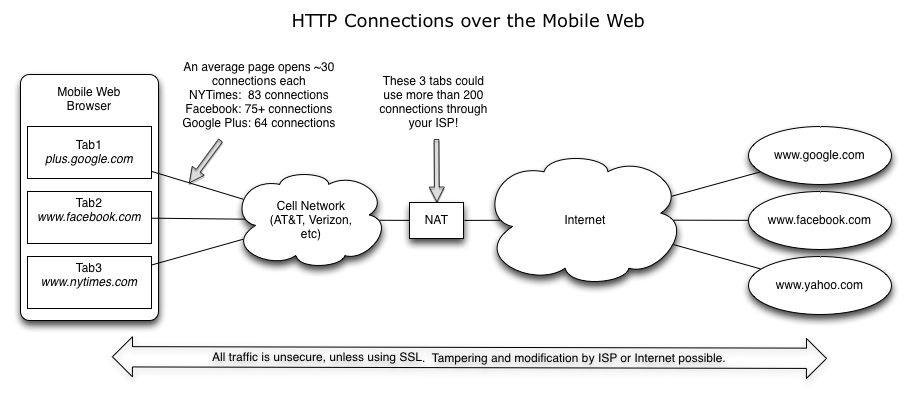
While this is great for performance now, I am worried about the wastefulness of HTTP on the Internet.  We used to only have one domain per site, now we have 7.  We used to have only 2 connections per domain, but now we have 6.  And on top of that, now we’re preconnecting when we don’t even need to?

With it’s proliferation of TCP connections, HTTP has been systematically sidestepping all of TCP’s slow start and congestion controls.  Sooner or later will the internet break?  Throwing inefficiency at the problem can’t go on forever.

So one last note – a blatant plug for SPDY

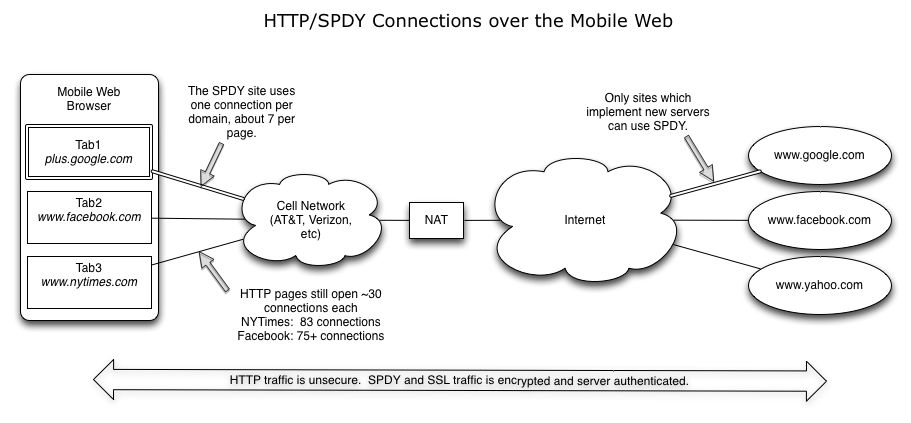
The downside of preconnect is a big part of why we’re working on SPDY.  HTTP has been nothing short of a heroic protocol and made the Internet as we know it possible.  But as we look to the next generation of rich media sites with low latencies, it is clear that today’s HTTP can’t perform at that level.

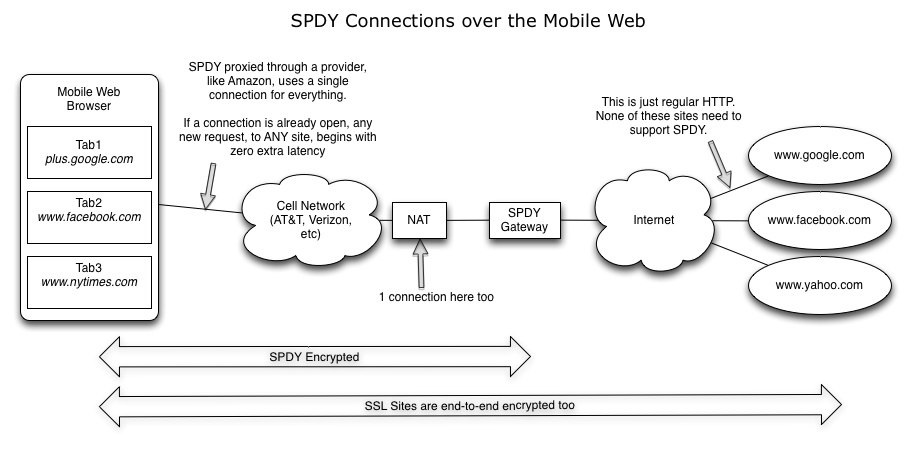
SPDY hopes to solve much of HTTP’s connection problems while also providing better performance and better security. 

With that, I guess I need to get back to work…

H.264 – Who Holds the Patents?

Monday, January 17th, 2011

H.264 is in the news because Google Chrome won’t support it natively and instead will use WebM, an allegedly open and free video alternative.

Who gets paid when you license H.264?  It’s managed by MPEG-LA.  They have a 70-page list of patents which allegedly contribute to H.264.  If you hear a complaint about Google, Mozilla, and Opera’s stance on not supporting H.264, consult this list to see if the complainer has a conflict of interest.

H.264 Patent Holders

Apple Inc.
Cisco Systems Canada IP Holdings Company†
The Trustees of Columbia University in the City of New York
DAEWOO Electronics Corporation
Dolby Laboratories Licensing Corporation
Electronics and Telecommunications Research Institute
France Télécom, société anonyme
Fraunhofer‐Gesellschaft zur Foerderung der angewandten Forschung e.V.
Fujitsu Limited
Hewlett‐Packard Company
Hitachi, Ltd.
Koninklijke Philips Electronics N.V.
LG Electronics Inc.
Microsoft Corporation
Mitsubishi Electric Corporation
Nippon Telegraph and Telephone Corporation
NTT DOCOMO, INC.
Panasonic Corporation†
Polycom, Inc.
Robert Bosch GmbH
Samsung Electronics Co., Ltd.
Sedna Patent Services, LLC
Sharp Corporation
Siemens AG
Sony Corporation
Tandberg Telecom AS
Telefonaktiebolaget LM Ericsson
Toshiba Corporation
Victor Company of Japan, Limited

Google Will Rue The Day It Invited the Gov’t to Net Neutrality

Tuesday, December 21st, 2010

A few years ago, Google started poking the government to act on Net Neutrality.  The motive behind Google’s goal is well intentioned.  But practically, it is foolish.  We’re inviting a beast into our industry that is more devastating than any beast we’ve yet imagined.  Eventually, Google will come to oppose the very legislation that it helped create.

The main problem with Net Neutrality is that we don’t need it.  The market works.  There are many choices for network access today, and you can access your favorite sites from Amazon to Wikileaks from almost anywhere in America.  We have access to the internet at home, in libraries, in schools and at work.  Who is not getting access again?

For individuals, the real debate is that some people want more bandwidth to more remote areas and they want someone else to pay for it.  Steve Wozniak, the eccentric co-founder of Apple, was very clear about this.  He wants to live on a remote hill, pay $29/mo, and have everyone else be required to pay to run the cables to his secluded hide away for fast internet access.  Steve’s argument is not new.  Many people have made the same argument far more elegantly.  They claim it “costs too much” for the high speed links and that dialup is unreasonably slow, or that “there is only one provider in my area”, etc.  None of those arguments hold.  These very same people still have access through wireless, through dialup, at work, at school, at the library, and at about a half million Starbucks or McDonalds across the planet.  And their access grows every single day!  They just want it cheaper.

Finally, the most important part of net neutrality is ensuring that content is available to everyone.  (No, this doesn’t mean you should get to watch your “Family Guy” or your favorite TV show for free)  Most of us hold at least some fear that eventually a big company (Comcast, AT&T, or Verizon, or Google) will screw the little guy by using their monopoly to restrict content and maximize profits.  This fear is reasonable,  because censorship on a grand scale would be a horrible thing for all of us.  But it’s not happening, and there is no evidence of it happening any time soon.  Further, if it ever did happen, customers can and would revolt.  Competition provides us everything we need.

But our fears of corporations are grossly misplaced.  There is someone far more scary, with vastly greater power that we should fear – the US government.  There is simply no company that can wreck devastation at the scale of the US government. Who’s rules are more scary – Comcast’s rules (sorry to pick on you, Comcast!), which would only apply to those that pay Comcast money?  Or Uncle Sam’s rules?  And every 4 years we elect a new set of politicians.  Even if we trust the politicians today, what happens when we get into a war, or have a 9/11-type event, and suddenly a “temporary” cease of terrorist communications is required?  (Did we forget about the TSA already?)  Who’s the terrorist?  Is Wikileaks a terrorist?  Is Wikipedia?  What if you have a science blog about particle physics?  Can you be shut down too?  The government is what you should fear.  Not a piddly little Microsoft, Google, or Comcast. 

Ok, but why will Google rue this?

With continued prodding from Google and others, legislation will be passed, and today was a starting point.  Whatever they pass will be  costly to companies and will cause that cost burden to be passed on to customers like you and me.  Further, it will put America at a disadvantage in our global marketplace.  All to solve a problem that doesn’t exist.

The first problem they’ll create is that of cost.  Every law has enforcement, and that means we pay people to define the specific rules, monitor compliance with those rules, and enforce punishments for those that do not obey.  This will cost billions of dollars and be spread into the margins of every content provider and ISP in America.  Of course, those companies will pass the cost onto their customers.  This means the price of DSL, Cable, AOL, and Netflix will all rise.  (I still think costs are heading down overall, but they could decrease faster without net-neutrality)

Second, it will snowball from “fair access” into content filters (aka censorship).  Initially, it might include banning certain forms of pornography.  It might even seem like something you agree with.  But with each new regulation, our freedoms are diminished.  Then, we might enter into a particular international conflict “requiring” a ban on certain types of communications to keep us safe.  With the content filters in place, the variety and types of information we can publish and read diminishes, and it is all out of our control.   You can’t switch providers to escape the unfairness of it all.

Finally, remember that America is in a global marketplace.  If our legislators legislate too much, Internet companies will simply move out of the country, taking the jobs, the profits, and the tax revenues with them.  This has already happened – gambling is alive and well on the internet – it just runs out of Costa Rica, Antigua, and other disputable places – leaving consumers at risk while simultaneously sticking America with a bill to ensure that gambling doesn’t happen here.  How silly!  Now the government will need to block outside access, or credit card payments to certain areas in order to keep Americans safe from information.

Google’s mission is “to organize the world’s information and make it universally accessible and useful.”  But with our own Government censors and the massive costs created to enforce “net neutrality”, Google will find this mission impossible to accomplish.  And that is when Google will rue the day…


Note: This article solely represents the views of a far-too-opinionated software engineer, and does not represent the views of his employer in any way.

Performance and the TLS Record Size

Friday, December 17th, 2010

Today I ran into a problem with TLS (SSL) Record Sizes causing the performance of my site to be sluggish and slow.  The server was doing a good job of sending large messages down the client, and I am using a late-model version of the OpenSSL library, why would this happen?

HTTP and TLS both seem like streaming protocols.  But with HTTP, the smallest sized “chunk” you can send is a single byte.  With TLS, the smallest chunk you can send is a TLS record.  As the the TLS record arrives on the client, it cannot be passed to the application layer until the full record is received and the checksum is verified.  So, if you send large SSL records, all packets that make up that record must be received before any of the data can be used by the browser.

In my case, the HTTP-to-SPDY proxy in front of my webserver was reading chunks of 40KB from the HTTP server, and then calling SSL_Write() for as much of that data over SPDY (which uses SSL for now).  This meant that the client couldn’t use any of the 40KB until all of the 40KB was received.  And since 40KB of data will often incur round-trips, this is a very bad thing.

It turns out this problem surfaces more with time-to-first-paint than with overall page-load-time (PLT), because it has to do with the browser seeing data incrementally rather than in a big batch.  But it still can impact PLT because it can cause multi-hundred-millisecond delays before discovering sub-resources.

The solution is easy – on your server, don’t call SSL_Write() in big chunks.  Chop it down to something smallish – 1500-3000 bytes.  Here is a graph comparing the time-to-first paint for my site with just this change.  Shaved off over 100ms on the time-to-first-paint.

smallbuf.ttfp

Gettys on Bufferbloat

Thursday, December 9th, 2010

Jim Gettys has a nice tale of what he calls ‘bufferbloat’.  Instinctively, it seems like bigger buffers should result in less packet loss.  As long as you can buffer it, the other guy doesn’t have to retransmit, right?  But that is not the way TCP works.  It’s going to retransmit if you don’t reply fast enough.  And if you clog the buffers, its going to take a long time before the endpoint can acknowledge the data.

One interesting anecdote to me (and it isn’t really a conclusion) is that the world’s love affair with Windows XP (which has an ancient TCP stack) may actually be helping the internet at large, even though the Vista TCP stack is measurably a better stack:

The most commonly used system on the Internet today remains Windows XP, which does not implement window scaling and will never have more than 64KB in flight at once. But the bufferbloat will become much more obvious and common as more users switch to other operating systems and/or later versions of Windows, any of which can saturate a broadband link with but a merely a single TCP connection.

Gettys did conclude that this was a problem for video downloads, which is something everyone is doing these days.  He’s not wrong, but real video services may not be as subject to this as it seems.  Video services live-and-die by bandwidth costs, so to preserve bandwidth costs, they avoid simply transmitting the whole video – instead they dribble it out manually, at the application layer.  If they depended on TCP for throttling, he’d be right, but I don’t think many large-scale video services work this way.  Need more data! :-)

Anyway, a great read.

Chrome Speeding up SSL with SSL FalseStart

Sunday, December 5th, 2010

The latest releases of Chrome now enable a feature called SSL False Start.  False Start is a client-side change which makes your SSL connections faster.  As of this writing, Chrome is the only browser implementing it.  Here is what it does.

In order to establish a secure connection, SSL uses a special handshake where the client and server exchange basic information to establish the secure connection.  The very last message exchanged has traditionally been implemented such that the client says, “done”, waits for the server, and then the server says, “done”.  However, this waiting-for-done is unnecessary, and the SSL researchers have discovered that we can remove one round trip from the process and allow the client to start sending data immediately after it is done.

To visualize this, lets look at some packet traces during the handshake sequence, comparing two browsers:

Chrome

Browser w/o FalseStart

  0ms SEND TCP SYN
83ms RECV TCP SYN ACK
83ms SEND TCP ACK
83ms SEND Client Hello
175ms RECV Server Hello
           Certificate
           Server Hello Done
176ms SEND Client Key Exchange
           Change Cipher Spec
           Enc Handshake Msg
           HTTP Request
274ms RECV Enc Handshake Msg
           Change Cipher Spec
           Enc Handshake Msg
275ms RECV HTTP Response
  0ms SEND TCP SYN
84ms RECV TCP SYN ACK
84ms SEND TCP ACK
84ms SEND Client Hello
173ms RECV Server Hello
           Certificate
           Server Hello Done
176ms SEND Client Key Exchange
           Change Cipher Spec
           Enc Handshake Msg

269ms RECV Enc Handshake Msg
           Change Cipher Spec
           Enc Handshake Msg
269ms SEND HTTP Request

524ms RECV HTTP Response

These two traces are almost identical.  Highlighted in red is the subtle difference.  Notice that Chrome sent the HTTP Request at time 176ms, which was a little more than one round-trip-time faster than the other browser could send it. 

(Note- it is unclear why the HTTP response for the non-FalseStart browser was 250ms late; the savings here is, in theory, just 1 round trip, or 83ms.  There is always variance on the net, and I’ll attribute this to bad luck)

Multiplicative Effect on Web Pages
Today, almost all web pages combine data from multiple sites.  For SSL sites, this means that the handshake must be repeated to each server that is referenced by the page.  In our tests, we see that there are often 2-3 “critical path” connections while loading a web page.  If your round-trip-time is 83ms, as in this example, that’s 249ms of savings – just for getting started with your page.  I hope to do a more thorough report on the effect of FalseStart on overall PLT in the future.

For more information on the topic, check out Adam Langley’s post on how Chrome deals with the very few sites that can’t handle FalseStart.

Linux Client TCP Stack Slower Than Windows

Friday, November 19th, 2010

Conventional wisdom says that Linux has a better TCP stack than Windows.  But with the current latest Linux and the current latest Windows (or even Vista), there is at least one aspect where this is not true.  (My definition of better is simple- which one is fastest)

Over the past year or so, researchers have proposed to adjust TCP’s congestion window from it’s current form (2pkts or ~4KB) up to about 10 packets.  These changes are still being debated, but it looks likely that a change will be ratified.  But even without official ratification, many commercial sites and commercially available load balancing software have already increased initcwnd on their systems in order to reduce latency. 

Back to the matter at hand – when a client makes a connection to a server, there are two variables which dictate how quickly a server can send data to the client.  The first variable is the client’s “receive window”.  The client tells the server, “please don’t exceed X bytes without my acknowledgement”, and this is a fundamental part of how TCP controls information flow.  The second variable is the server’s cwnd, which, as stated previously is generally the bottleneck and is usually initialized to 2.

In the long-ago past,  TCP clients (like web browsers) would specify receive-window buffer sizes manually.  But these days, all modern TCP stacks use dynamic window size adjustments based on measurements from the network, and applications are recommended to leave it alone, since the computer can do it better.  Unfortunately, the defaults on Linux are too low. 

On my systems, with a 1Gbps network, here are the initial window sizes.  Keep in mind your system may vary as each of the TCP stacks does dynamically change the window size based on many factors.

Vista:  64KB
Mac:    64KB
Linux:    6KB

6KB!  Yikes! Well, the argument can be made that there is no need for the Linux client to use a larger initial receive window, since the servers are supposed to abide by RFC2581.  But there really isn’t much downside to using a larger initial receive window,  and we already know that many sites do benefit from a large cwnd already.  The net result is that when the server is legitimately trying to use a larger cwnd, web browsing on Linux will be slower than web browsing on Mac or Windows, which don’t artificially constrain the initial receive window.

Some good news – a patch is in the works to allow users to change the default, but you’ll need to be a TCP whiz and install a kernel change to use it.  I don’t know of any plans to change the default value on Linux yet.  Certainly if the cwnd changes are approved, the default initial receive window must also be changed.  I have yet to find any way to make linux use a larger initial receive window without a kernel change.

Two last notes: 

1) This isn’t theoretical.  It’s very visible in network traces to existing servers on the web that use larger-than-2 cwnd values.  And you don’t hit the stall just once, you hit it for every connection which tries to send more than 6KB of data in the initial burst.

2) As we look to make HTTP more efficient by using fewer connections (SPDY), this limit becomes yet-another-factor which favors protocols that use many connections instead of just one.  TCP implementors lament that browsers open 20-40 concurrent connections routinely as part of making sites load quickly.  But if a connection has an initial window of only 6KB, the use of many connections is the only way to work around the artificially low throttle.

There is always one more configuration setting to tweak.